
 USD
USD CAD
CAD EUR
EUR GBP
GBP AUD
AUD NZD
NZD CHF
CHF SEK
SEK NOK
NOK JPY
JPY CNY
CNY INR
INR SGD
SGD MXN
MXN BRL
BRL ZAR
ZAR KRW
KRW
Fed up with having to manually create bills of materials (BOMs) from your SOLIDWORKS PDM vault? You’re not the only one. Manually exporting BOM data into Excel is tedious and prone to errors, especially if you want to include visual context like thumbnails.
This is where PDM2Excel helps. Our heavy-duty utility will export your SOLIDWORKS PDM BOMs to XLSX with quick and easy effort. Please keep reading this article to know how to export SolidWorks PDM BOMs to XLSX with thumbnails.
![Export SolidWorks PDM BOMs to XLSX with thumbnails and A screenshot of a software interface titled "Export BOM with Thumbnails [Task] - Properties." The left side shows a menu with options like Add-in, Execution Method, Scheduling, Settings, BOM, Thumbnails (highlighted), Permissions, Success Notification, and Error Notification. The right side displays a settings panel under "Document Manager" with fields for "Document Manager API Key" (with a note to request it from your SolidWorks Reseller), "Enable thumbnails" set to "True," and "Thumbnails folder" (empty). Buttons at the bottom include "Back," "Next," "OK" (highlighted), "Cancel," and "Help," with "Export..." and "Import..." options above them](https://bluebyte.biz/wp-content/uploads/2022/04/image.png)
The Automation Power of PDM
PDM automation isn’t merely about time savings; it’s also about improving accuracy and process simplification. Here’s the picture: your BOMs populated automatically with the right information, such as configuration, quantity, state, and even high-definition thumbnails.
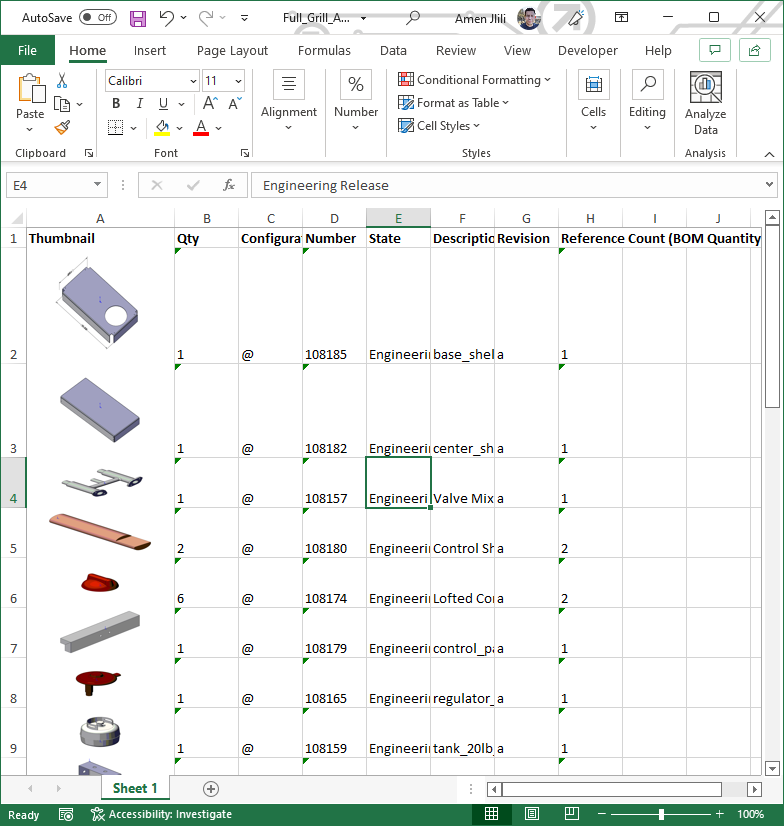
It’s an engineer’s, procurement individual’s, and anyone who ever must review and OK a BOM in a hurry’s utopia. With our latest version of PDM2Excel 6, we incorporated an extremely useful feature that exports your PDM BOM with thumbnails to an XLSX file directly. Bye-bye to the pain of screenshotting or copy-and-pasting.
How to Export Your PDM BOMs with Thumbnails?
To export your PDM BOMs with thumbnails… it can be done directly from the PDM2Excel task setup page, where you have full control of the output. The following are the key settings that have been explained:
- Enable Thumbnails: Switch (true/false) on or off to indicate if and whether the task can save thumbnails.
- Document Manager API Key: This is a key security setting. You will require a specific Document Manager API key in order to generate the thumbnails. It is available from your SOLIDWORKS reseller or directly from us.
- Thumbnails Folder: You can choose where you’d like to have the thumbnail images (.png files) saved. It can be a relative path to the vault root, an absolute path, or a path in or out of the vault. This feature is particularly useful to teams that wish to have a centralized repository of their thumbnails.
What’s with This “Save Thumbnail in Excel?”
You might be asking yourself, “What is save thumbnail in Excel, and why do I even need it?”. Well… to answer, it’s the process of placing a small graphical preview of a file in your spreadsheet.
For a BOM, that equates to having a picture of each part next to its data. That provides you with precious context. Besides, with these thumbnails, identifying parts and detecting possible errors becomes much easier on the eye.
An Overview of Open Source PDM Solutions
Even though open source PDM SOLIDWORKS solutions are available, they usually require a lot of development and upkeep. On the other hand, PDM2Excel is a solidly developed purpose solution that integrates well into your own SOLIDWORKS PDM infrastructure, with less time and resources remaining for you.
Automatically exporting your SOLIDWORKS PDM BOMs to XLSX with thumbnails is the smart move to boost your productivity by a notch and improve data quality. PDM2Excel provides you with the unique, high-powered PDM automation tool necessary to do just that and provide you with clean, readable BOMs every time.
Interested in finding out more? Get in touch with us today to organize your API key and see how PDM2Excel can revolutionize your BOM generation process and productivity.