US$0.00
0

PDMShell

A modern Dispatch replacement for SOLIDWORKS PDM Professional, built for flexible scripting and workflow automation.

OVERVIEW

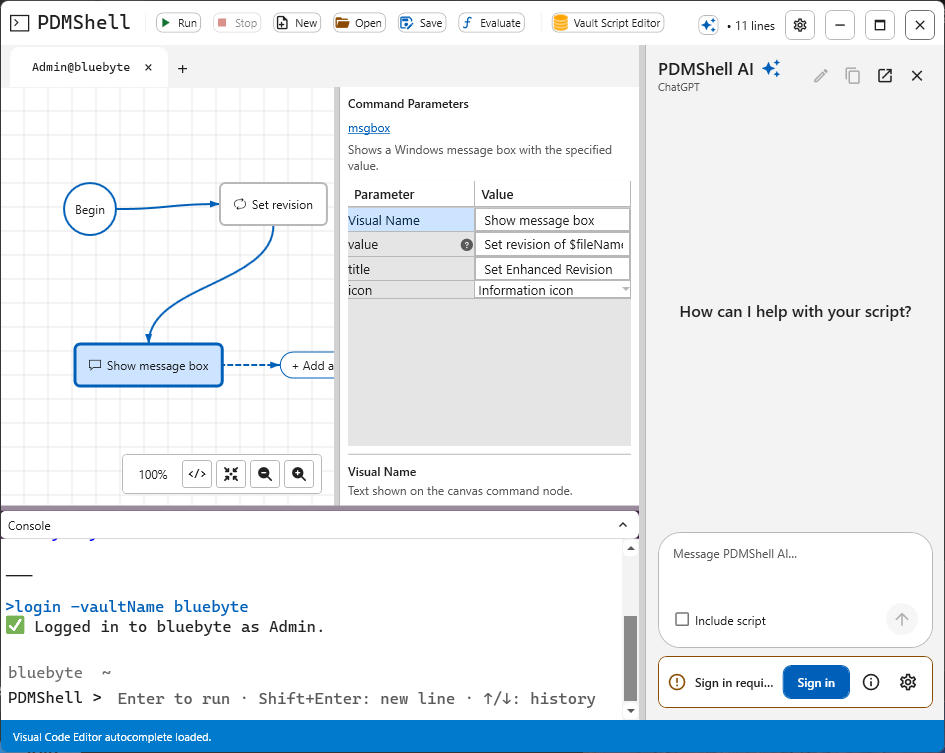
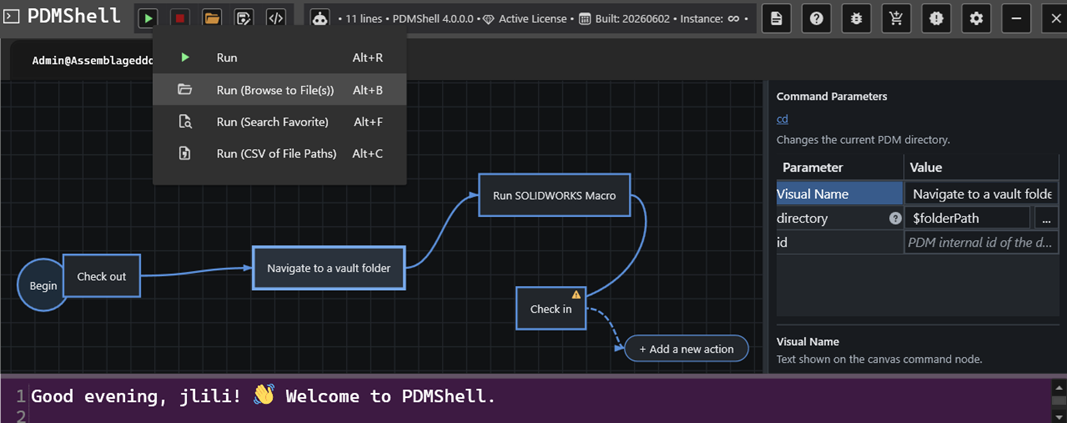
PDMShell is a scripting and automation platform for SOLIDWORKS PDM Professional that simplifies complex vault operations. Designed as a modern alternative to Dispatch, it enables administrators and developers to automate file management, metadata updates, workflow transitions, version control, and other PDM tasks through a powerful scripting engine and command-line interface.

PRICE

Seat pricing
SeatsPrice per seat
1-3US$999.00
4-7US$749.00
8+US$499.00

REQUIREMENTS

FEATURES

PDMShell is a modern automation and scripting platform for SOLIDWORKS PDM Professional, built as a powerful alternative to Dispatch. Automate repetitive vault operations, create advanced workflows, update metadata, manage files and folders, perform state changes, and execute complex automation using an easy-to-use scripting engine and command-line interface.

To get started with PDMShell, visit https://pdmshell.com.


Full Description

PDMShell is a SOLIDWORKS PDM automation tool that helps teams run cleanup, validation, batch processing, workflow, and data card tasks through simple commands and reusable scripts.


Get PDMShell from Microsoft Store

or

DOWNLOAD IT FROM PDMSHELL.COM

Download Options

Choose the installer or deployment option that matches your environment.

Option Use This When Download
PDMShell Installer Install the standalone PDMShell desktop application on a workstation. Download installer
PDMDeploy Deploy Blue Byte Systems add-ins into a SOLIDWORKS PDM vault. Download PDMDeploy
PDMShell PDM Add-in Download the PDMShell add-in .cex file from the Microsoft-hosted SharePoint Download Center. Open Download Center

PDMShell Free vs Premium

PDMShell comes in two editions: Free for evaluation and lightweight command-line use, and Premium for production automation in SOLIDWORKS PDM.

Overview

Edition Best For
Free Evaluation, quick validation, and small command-line jobs.
Premium Production automation, unlimited scripting, workflow integration, and PDMShell add-in deployment.

Feature Comparison

Feature Free Premium
Search result limit 5 items Unlimited
Runscript script length 5 lines Unlimited
Command-line use Yes, with Free limits Yes, without Free limits
Workflow transitions No Yes
PDMShell add-in No Yes
Automation scripting Limited to 5 script lines Unlimited
Priority support No Yes
Commercial use Yes, non-resellers only Yes
Reseller use No Yes
Cost Free Seat-based annual pricing

Premium Licensing

Premium licensing is seat-based. A seat can be activated on a single machine through the standalone PDMShell application, or managed through the PDMShell add-in license manager when you want pooled vault access.

Option Activation Location Best For
Single machine Standalone PDMShell application installed on the workstation One workstation or one administrator
License pool PDMShell add-in license manager in the SOLIDWORKS PDM Administration Tool Teams using PDMShell add-in automation from a shared PDM vault

Get in Touch

Training and resources

Getting Started

Learn the essential first steps to automate your SOLIDWORKS designs with guidance from Blue Byte Systems.

Learning Portal

Visit our Learning Portal on YouTube to access a variety of training videos and helpful resources from Blue Byte Systems—available anytime, anywhere.
0
0
Your Cart
Your cart is emptyReturn to Shop