
 USD
 CAD
 EUR
 GBP
 AUD
 NZD
 CHF
 SEK
 NOK
 JPY
 CNY
 INR
 SGD
 MXN
 BRL
 ZAR
 KRW
Home/Store/Desktop app and PDM add-in
PDMShell for SOLIDWORKS PDM
Command line and workflow automation for SOLIDWORKS PDM Professional. Run cleanup, validation, batch processing, workflow and data card tasks through simple commands and reusable scripts, with an MCP server for Claude and Codex.
- Free edition and 7-day trial
- From ¥116,300 per seat per year
- Works with Claude and Codex
The PDMShell console, its commands and your first SOLIDWORKS PDM script.
One tool, three ways to automate your vault
PDMShell is a scripting engine for SOLIDWORKS PDM Professional. Write a script once, then run it the way that fits the job.

Standalone app for batch scripting
A console and visual script editor for jobs across thousands of files: check ins, renames, moves, references, data cards and exports. Run them by hand or on a schedule.
Read the docs →
PDM add-in, like Dispatch and more
Put scripts on the right-click menu and on workflow transitions. Everything Dispatch does, plus variables, conditions, data card logic, a visual editor and AI.
Moving from Dispatch?We convert your Dispatch scripts to PDMShell for you.See how → Read the docs →
PDM tasks
Run scripts as SOLIDWORKS PDM tasks on your task host, so heavy work happens in the background instead of on the user's computer.
Read the docs →Build it visually, or write the script
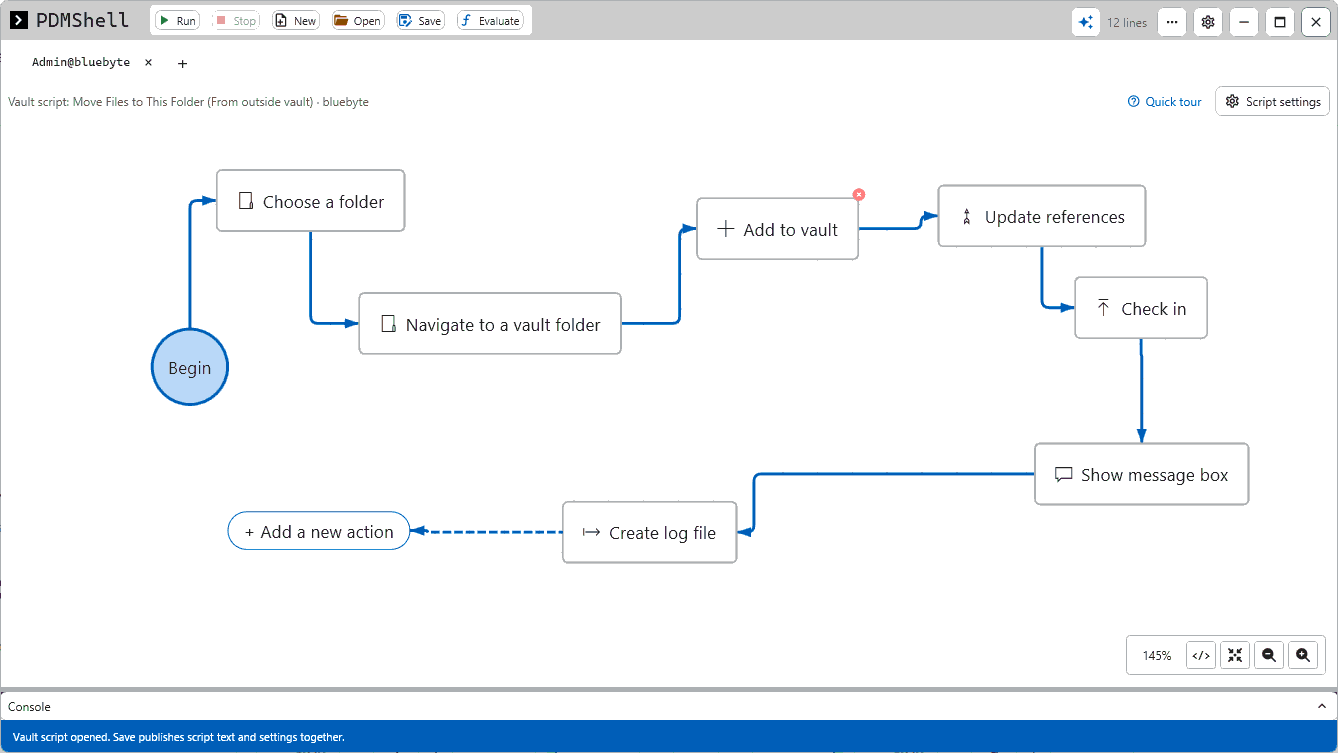
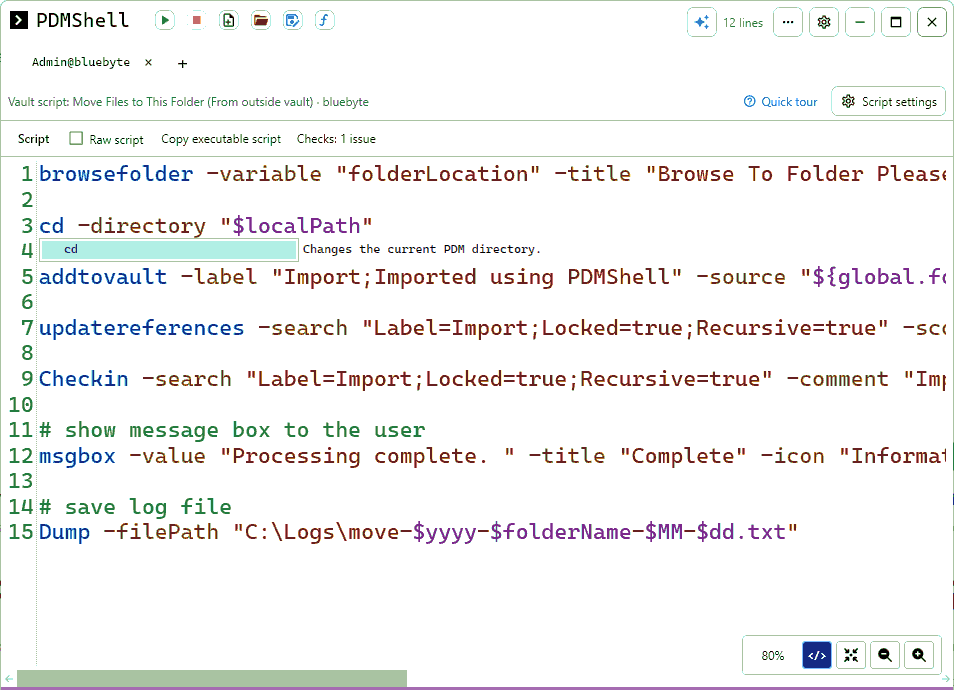
Every PDMShell script is a flow you can click together and plain text you can read, copy and keep in version control. Switch between the two with one click.
- Visual editor. Add actions, connect them and see the whole job at a glance.
- Script editor. Suggestions with Ctrl+Space and checks that flag issues before you run.
- Saved to the vault. Save publishes the script and its settings together, ready for menus, transitions and tasks.
AI ready, with the models you already use
Describe the job in plain language. PDMShell turns it into commands and scripts, and you review every step before it runs in your vault.
 ClaudeConnect Claude Desktop to your vault through the PDMShell MCP server.
 ChatGPT and CodexUse the same MCP server from ChatGPT and Codex.
- Ollama, local and cloudRun open models on your own hardware, or Ollama cloud models, right in the PDMShell AI chat.
Nothing changes in the vault until you approve the commands.
Watch: administrating a SOLIDWORKS PDM vault with AI and PDMShell.

Simple per seat pricing
Start free, upgrade when you need unlimited scripts, workflow transitions and the PDM add-in.
Costs less than writing and maintaining custom Dispatch scripts, and every action stays reviewable.
Free
Evaluation and small jobs
No credit card
Download free- Command shell
- Search results, 5 items
- Scripts up to 5 lines
- Visual editor
Starter
1 to 2 seats
per seat per year
About ¥13,850 per month per seat
- Unlimited search and scripts
- Workflow transitions
- PDMShell PDM add-in
- MCP server for Claude and Codex
- Priority support
Team
3 to 8 seats
per seat per year Save 20%
About ¥11,075 per month per seat
- Unlimited search and scripts
- Workflow transitions
- PDMShell PDM add-in
- MCP server for Claude and Codex
- Priority support
Department
9 or more seats
per seat per year Save 30%
About ¥9,692 per month per seat
- Unlimited search and scripts
- Workflow transitions
- PDMShell PDM add-in
- MCP server for Claude and Codex
- Priority support
Optional at checkout
Start a 7-day free trial · Need an invoice? Request a quote
Prefer to buy through your SOLIDWORKS reseller? PDMShell and PDMPublisher are also sold by our reseller partners. See all resellers
 Hawk Ridge Systems
 Strojotehnika
Free and Premium compared
Start with Free to learn the commands. Move to Premium when PDMShell runs your production automation.
| Free | Premium | |
|---|---|---|
| Best for | Evaluation and small command line jobs | Production automation in SOLIDWORKS PDM |
| Search results | 5 items | Unlimited |
| Script length | 5 lines | Unlimited |
| Command line and visual editor | ||
| CSV and source commands | Within Free limits | Unlimited |
| Workflow transitions | ||
| PDM add-in: right-click menus and trigger points | ||
| Pooled vault licenses | ||
| Priority support | ||
| Commercial use | Yes, not for resellers | Yes, resellers via agreement |
| Cost | Free | Per seat, yearly or perpetual |
| Download free | Try Premium free for 7 days |
Automation for SOLIDWORKS PDM
Goes further than Dispatch and keeps every action reviewable. Use it as a shell, from PDM menus and transitions, on a canvas or through AI.
See it in action
Short videos from the PDMShell playlist. Click any video to watch it here.
See the full PDMShell playlist on YouTube
“Your website is very user-friendly. The tutorials are very easy to follow, and it only took me about 10 minutes to update variables from a CSV using the setvarfromsource command. Very well done!”
 SB, PDM AdministratorSauder Manufacturing
Questions
Not sure? Book a short call and we will help you choose.
What does it require?
SOLIDWORKS PDM Professional. The standalone shell runs on a workstation; the add-in is deployed into the vault.
Does it work with SOLIDWORKS PDM Standard?
No. PDMShell requires SOLIDWORKS PDM Professional. SOLIDWORKS PDM Standard does not provide the API, add-in and task features PDMShell relies on, so it cannot run against a PDM Standard vault.
How is Premium licensed?
Per seat, per year. The price per seat drops at 3 and 9 seats. A seat can be activated on one machine through the standalone app, or pooled through the add-in license manager in the PDM Administration Tool.
Is there a perpetual license?
Yes. A perpetual license is a one-time payment per seat, twice the yearly price, and includes the first year of maintenance (updates and priority support). After that, maintenance is optional and renews yearly. If it lapses, PDMShell keeps working on every version released while maintenance was active.
Can I try it?
Yes. There is a 7-day trial, and the Free edition is available for evaluation and small jobs.
Which AI tools does it work with?
Claude Desktop and Codex, through the included MCP server. You review commands before they run.
Latest PDMShell articles
Guides and examples from the Blue Byte blog. See all PDMShell posts →
 Nov 16, 2026
How to Change the Workflow State of Many Files in SOLIDWORKS PDM
Move thousands of SOLIDWORKS PDM files through a workflow transition at once, by search or from a CSV. Read article →
 Nov 15, 2026
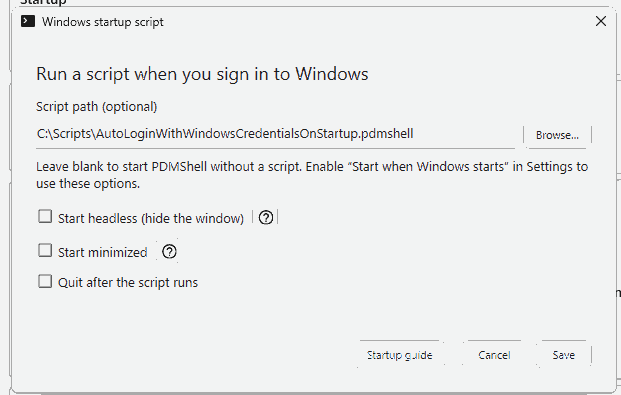
How to Log Into SOLIDWORKS PDM Automatically at Windows Startup With PDMShell
Log a SOLIDWORKS PDM task host back into the vault after every restart with a two-line PDMShell script and the built-in Windows… Read article →
 Nov 11, 2026
How to Export BOMs From SOLIDWORKS PDM to CSV in Bulk
Export the bill of materials of every assembly in a project from SOLIDWORKS PDM to CSV, per configuration and per BOM layout. Read article →
Automate your vault today
Start with the Free edition or a 7-day Premium trial.