
 USD
 CAD
 EUR
 GBP
 AUD
 NZD
 CHF
 SEK
 NOK
 JPY
 CNY
 INR
 SGD
 MXN
 BRL
 ZAR
 KRW

The bill of materials is usually built twice: once by SOLIDWORKS in a drawing table, and once by hand in Excel because the table cannot be grouped, filtered or fixed without editing every part. Purchasing wants a flat list, production wants the indented structure, and the customer wants neither the fasteners nor the phantom subassemblies.
BOM Manager
BOM Manager in PDMPublisher for SOLIDWORKS reads the active assembly into a live grid with the columns you choose.
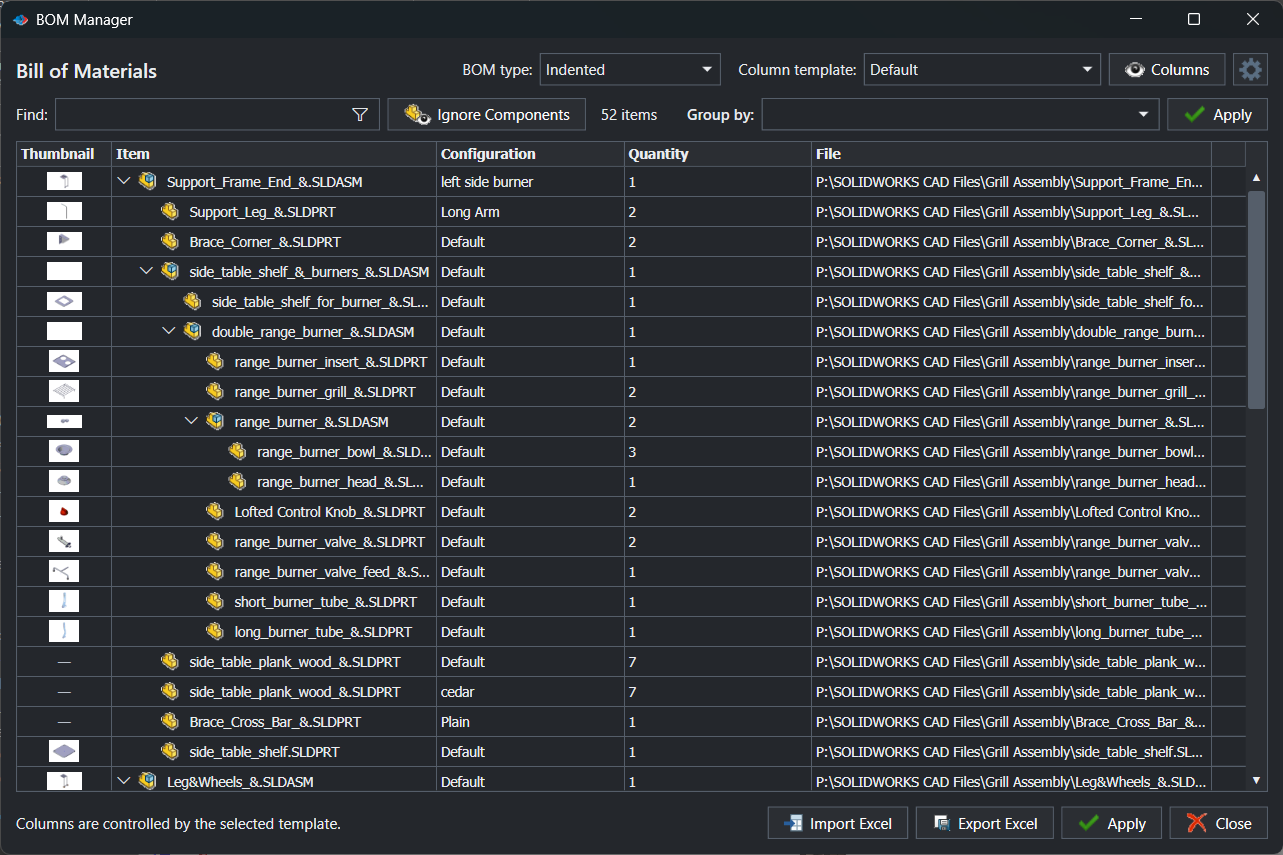
- Switch between Indented, Parts only and Top-level only.
- Group rows by an expression, such as material or supplier.
- Exclude components that match conditions, without suppressing anything in SOLIDWORKS.
- Export to Excel with your own workbook template, let someone correct it, and import it back.
- Apply supported edits to the models, so the properties stay in the SOLIDWORKS files.
Why the round trip matters
Corrections made in a spreadsheet usually die in that spreadsheet. With BOM Manager they go back into the parts, where title blocks, PDM data cards and ERP Sync read them.
Try it on your own files
Start a free 7-day trial of PDMPublisher for SOLIDWORKS, see plans and pricing, or read the BOM Manager guide. Questions? Book a short call with our team.