
 USD
 CAD
 EUR
 GBP
 AUD
 NZD
 CHF
 SEK
 NOK
 JPY
 CNY
 INR
 SGD
 MXN
 BRL
 ZAR
 KRW

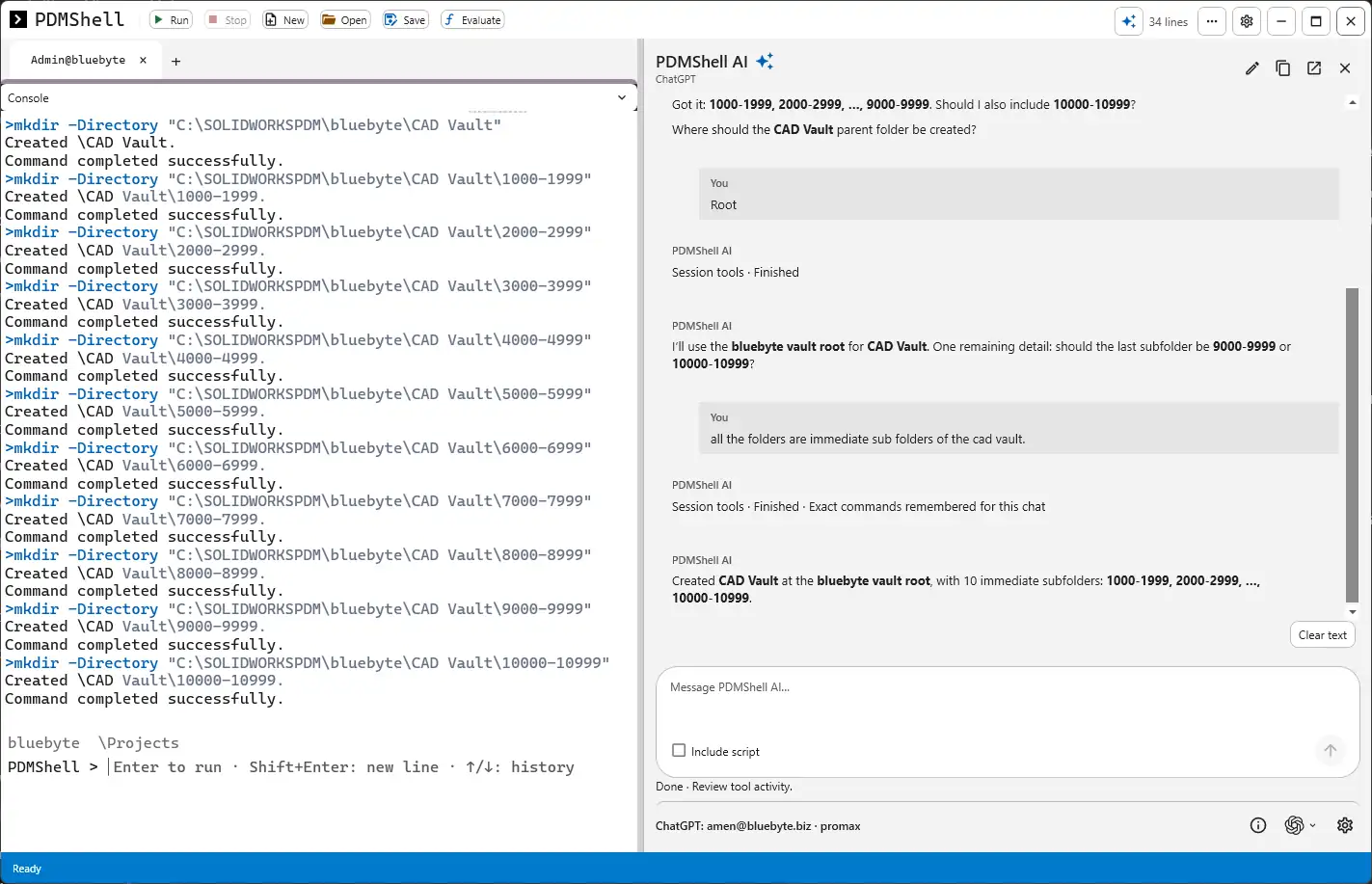
You can build a SOLIDWORKS PDM folder structure automatically by describing it to PDMShell AI in plain English. Tell it the parent folder, the naming pattern and where it goes, answer any question it asks, and it runs the PDMShell mkdir commands for you. In our test it created a CAD Vault folder with ten numbered range subfolders in a few seconds.
Folder structures are one of those jobs every PDM admin does by hand more often than they would like. A new vault, a new customer, a new project numbering scheme, and suddenly you are right clicking New Folder forty times and hoping you did not type 6000-6999 twice. It is not hard work, it is just slow and easy to get wrong. This is exactly the kind of task where letting AI write and run the commands makes sense, because the result is easy to check and the pattern is simple to describe.
What we asked PDMShell AI to do
The goal was a part number structure. We wanted a parent folder called CAD Vault and one subfolder per thousand part numbers: 1000-1999, 2000-2999 and so on. Companies that number parts sequentially use this layout a lot, since it keeps any one folder from growing to tens of thousands of files and makes it obvious where a new part belongs.
We typed the request into the PDMShell AI panel, which sits next to the console in PDMShell. We used ChatGPT as the provider for this run, but the same works with Claude or a local Ollama model. Our post on choosing between ChatGPT, Claude and Ollama in PDMShell AI covers how to connect each one.
The AI asks before it creates anything
The part we liked most is that it did not guess. Our request said 1000-1999 up to 9000-9999 with an ellipsis in the middle, and the AI came back with two questions. First, should the last folder be 9000-9999 or should it also add 10000-10999? Second, where should the CAD Vault parent folder be created?
We answered root for the location. When it asked again about the last range, we told it that all the folders are immediate subfolders of CAD Vault, and it settled on ten folders ending at 10000-10999. That back and forth took less than a minute and it is the step that saves you from cleaning up a wrong structure later. Deleting folders in a vault is far more annoying than creating them, especially once someone has already checked a file in.
The commands it ran
Once the questions were answered, PDMShell AI ran the commands in the console. Each one is a normal PDMShell mkdir call with the full local path of the vault view, and each one reports back what it created:
>mkdir -Directory "C:\SOLIDWORKSPDM\bluebyte\CAD Vault"
Created \CAD Vault.
Command completed successfully.
>mkdir -Directory "C:\SOLIDWORKSPDM\bluebyte\CAD Vault\1000-1999"
Created \CAD Vault\1000-1999.
Command completed successfully.
>mkdir -Directory "C:\SOLIDWORKSPDM\bluebyte\CAD Vault\2000-2999"
Created \CAD Vault\2000-2999.
Command completed successfully.
...
>mkdir -Directory "C:\SOLIDWORKSPDM\bluebyte\CAD Vault\10000-10999"
Created \CAD Vault\10000-10999.
Command completed successfully.
The AI then summarised the result in the chat: CAD Vault created at the vault root with ten immediate subfolders, 1000-1999 through 10000-10999. Because every command is printed in the console, you can see exactly what happened instead of trusting a summary. If something looks off you can scroll up and read the line that did it.
A note on the paths: the path is wrapped in quotes in the command because the folder name has a space in it. If you write these commands yourself, that is the first thing to watch for. Leave them out and the space splits the path into two values, so the command fails or creates the wrong folder.
Why this works better than a script you write once
You could write this as a loop in a PDMShell script, and for a structure you build every week you probably should. The AI approach wins when the structure changes each time. One customer wants ranges of 1000, another wants ranges of 500, a third wants project folders with CAD, Drawings and Documents underneath each one. Describing it takes ten seconds. Editing a script for a one off layout takes longer than that, and you are more likely to leave a stale value in it.
It also helps people who are new to PDMShell. They do not need to remember the mkdir syntax or the vault path format. They describe the folders, read the commands the AI ran, and learn the syntax from real examples on their own vault. After a few of these, most admins start writing the simple ones themselves.
Tips for good results
- Spell out the full range. Writing 1000-1999 through 10000-10999 removes the guesswork, and the AI can go straight to creating folders.
- Say where the parent goes. Root of the vault, or a full path such as Projects\2026. If you leave it out the AI will ask, which is fine, but it adds a round trip.
- Say whether the subfolders are nested or side by side. Immediate subfolders of the parent is the phrase that settled it for us.
- Check folder permissions afterwards. New folders in SOLIDWORKS PDM take their permissions from the parent folder, so create the parent in the right place and permissions follow. If you need different permissions per range, set them after the structure exists.
- Ask the AI to write the commands as a script when you want to reuse the structure. Save it from PDMShell and run it again on another vault or on a schedule. Tick Include script if you want the AI to extend a script you already have open.
If you want to run structures like this unattended, for example a new set of project folders every Monday, the same commands can be saved as a script and run from Windows Task Scheduler. We walk through that setup in our guide to automating weekly SOLIDWORKS PDM tasks with PDMShell and Task Scheduler.
Frequently asked questions
Does PDMShell AI create the folders without asking me?
It runs the commands once the request is clear. When something is ambiguous, like where the parent folder goes or where a range ends, it asks first. Every command it runs is shown in the console so you can review it.
Do I need an API key to use PDMShell AI?
Not for ChatGPT, which you sign into directly. Claude needs an Anthropic API key, and Ollama runs local models on your own machine. See our Ollama setup guide if your company prefers to keep everything local.
Which license do I need?
PDMShell requires SOLIDWORKS PDM Professional and a PDMShell license. It can be activated on one computer or added to a vault license pool, as explained in how PDMShell licensing works.
Need help with SOLIDWORKS PDM automation?
If you are setting up a new vault or reorganising an old one, we build folder structures, workflows and the scripts that keep them tidy. Contact us and we can help you plan the structure and automate it with PDMShell.