
 USD
USD CAD
CAD EUR
EUR GBP
GBP AUD
AUD NZD
NZD CHF
CHF SEK
SEK NOK
NOK JPY
JPY CNY
CNY INR
INR SGD
SGD MXN
MXN BRL
BRL ZAR
ZAR KRW
KRW

SOLIDWORKS 3D offers users a dark and a light theme. To sync your Windows 10 default app mode with SOLIDWORKS 3D, you can use a custom add-in that automatically aligns the theme with your system settings.
There is a setting in Windows 10 that automatically turn on or off theme selection in third-party applications. SOLIDWORKS does not use that feature so it’s about time we wrote an article to show how a custom add-in can automatically pick up that Windows setting. First, to turn on or off app theme mode, you need to :
- Type theme in the Windows search bar and pick the first result.
- Click on Colours on the sidebar, and you will get this window.
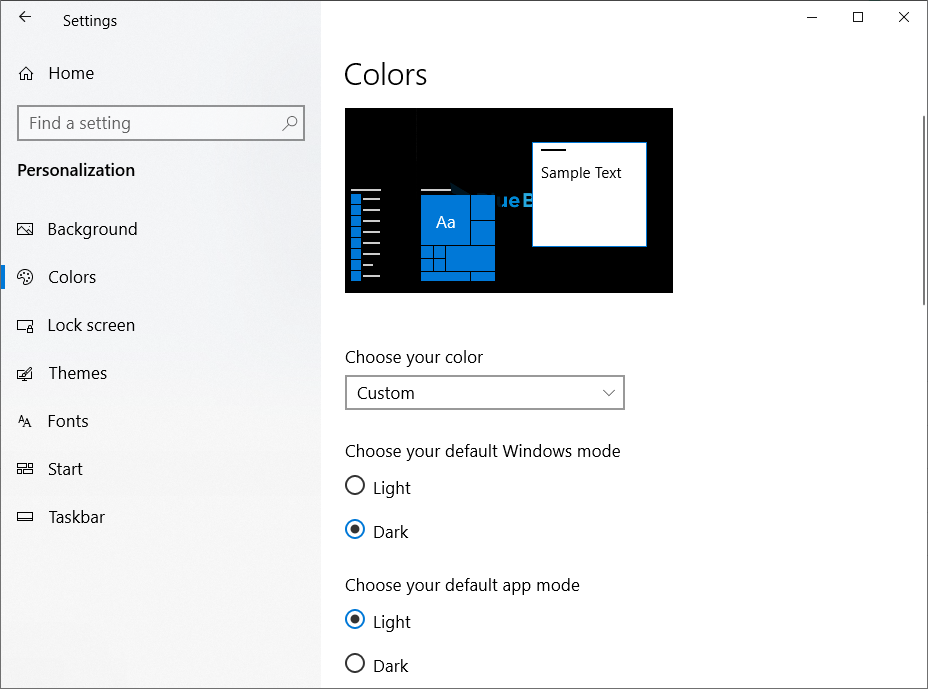
Clicking light or dark under “Choose your default app mode” will switch the theme in your applications. A good example is Google Chrome.
The source code of the add-in is available on our GitHub. It’s made of two classes:
– swAddIn.cs: This is the add-in class.
– WindowsThemeManager.cs : This class listens for registry changes when the default app mode values.
swAddIn.cs
WindowsThemeManager.cs:
