
 USD
USD CAD
CAD EUR
EUR GBP
GBP AUD
AUD NZD
NZD CHF
CHF SEK
SEK NOK
NOK JPY
JPY CNY
CNY INR
INR SGD
SGD MXN
MXN BRL
BRL ZAR
ZAR KRW
KRW

Ad-hoc copies are where numbering schemes break. Someone saves Bracket_v2_final.SLDPRT in a personal folder, forgets the drawing, and the file reaches PDM weeks later under a different name. The next person who searches for the part number finds nothing.
The manual way
File > Save As, look up the next number, type the name, browse to the right vault folder, copy the drawing, repoint it, then add and check in both files. Every step is a chance to get it wrong.
The one-click way
Save As New in PDMPublisher for SOLIDWORKS turns that sequence into one command driven by a reusable profile.
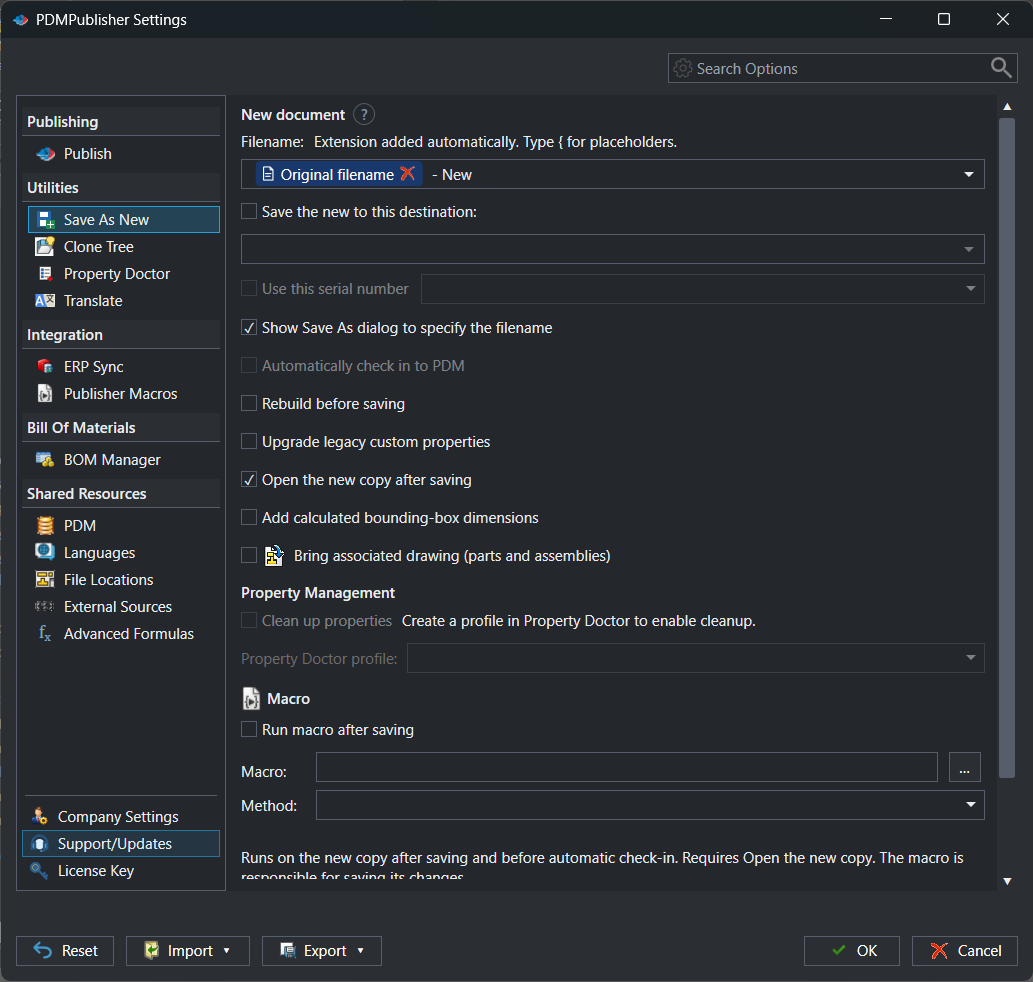
- Reserves a number from a SOLIDWORKS PDM Professional serial-number generator and uses it in the file name or folder.
- Builds the name from a template of text, properties, PDM values, formulas or a value you type at run time.
- Saves to a fixed folder, a folder built from a template, or through the normal Save As dialog.
- Copies the associated drawing and repoints it to the new model.
- Can rebuild first, open the copy, add bounding-box properties, run a macro and check everything in to PDM.
Share it with the team
Save the setup as a named profile and run it from the arrow beside the command. Share profiles by import and export or a six-digit PIN, so every engineer gets the same result.
Try it on your own files
Start a free 7-day trial of PDMPublisher for SOLIDWORKS, see plans and pricing, or read the Save As New guide. Questions? Book a short call with our team.