
 USD
 CAD
 EUR
 GBP
 AUD
 NZD
 CHF
 SEK
 NOK
 JPY
 CNY
 INR
 SGD
 MXN
 BRL
 ZAR
 KRW

Assemblies carry files that should never leave the vault: purchased hardware, reference envelopes, fixtures, library parts and components that are still in work. Picking them out by hand before every export is slow, and every engineer picks differently.
Write the rule once
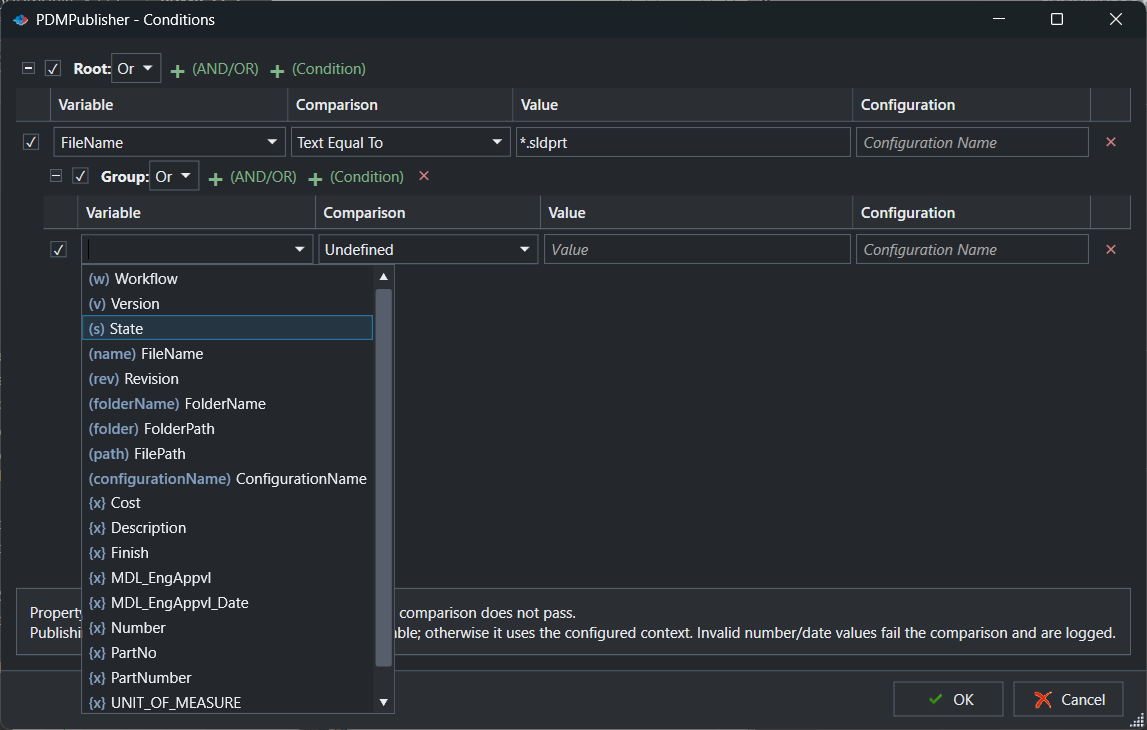
The PDMPublisher Conditions editor decides which files a publish job touches. Every reference of the assembly is tested against your rules, and only the files that pass are exported. Skipped files show in the results as Does not match profile conditions.
Examples
- Parts only: FileName, Text, Equal To,
*.sldprt - Released only: State equal to Released
- No purchased parts: a custom property such as Make/Buy not equal to Buy
- Combinations: put rows in And or Or groups, nested as deep as the rule needs
Why it works for teams
- The editor looks like a PDM search card, with the same states, revisions and data card variables, so PDM admins recognise every control.
- Rules are saved with the profile in the add-in, and with the task in PDM Professional.
- Untick a row or a group to test a rule without deleting it.
Try it on your own files
Start a free 7-day trial of PDMPublisher for SOLIDWORKS, see plans and pricing, or read the Conditions editor guide. Questions? Book a short call with our team.