
 USD
USD CAD
CAD EUR
EUR GBP
GBP AUD
AUD NZD
NZD CHF
CHF SEK
SEK NOK
NOK JPY
JPY CNY
CNY INR
INR SGD
SGD MXN
MXN BRL
BRL ZAR
ZAR KRW
KRWSOLIDWORKS Odoo integration, inside SOLIDWORKS
PDMPublisher ERP Sync creates Odoo products, fills their fields from your custom properties and builds the bill of materials from the open assembly. You review every change before anything is written.
No middleware, no cloud service in between and no custom code to maintain.

SOLIDWORKS property
Odoo field
Watch the Odoo connector in action
What goes from SOLIDWORKS to Odoo
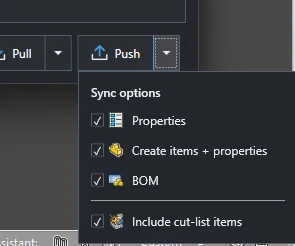
Choose any combination on each push. The assembly stays the source, and Odoo receives exactly what the feature tree says.
- Products
- Missing parts and assemblies are created as Odoo products, using an item code you choose, such as the file name or a part number property.
- Fields
- Custom and configuration properties such as description, material, weight or vendor fill the Odoo fields you map them to.
- Bills of materials
- The assembly structure becomes an Odoo BOM set to manufacture the product, with every component and quantity.
- Cut lists
- Weldment and sheet metal cut list rows can be sent as their own lines.
- Files
- Optionally, part thumbnails and exported STEP, DXF or PDF files are attached to the product.
How a push works
Set up the connection and mapping once. After that, every sync is three clicks, and nothing reaches Odoo until you approve it.
Map properties to Odoo fields
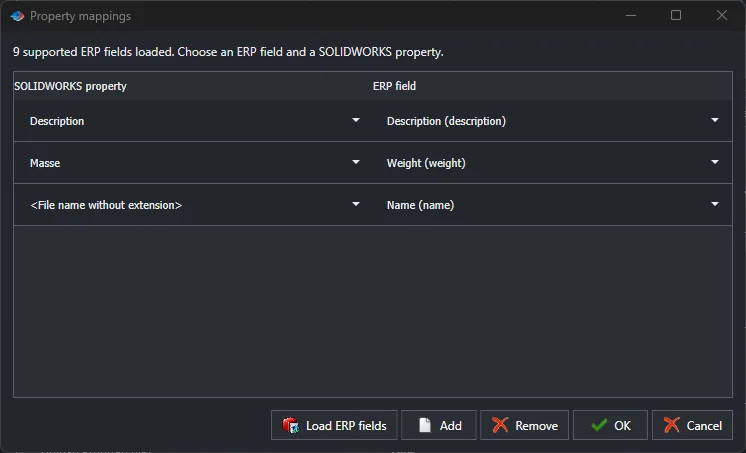
Click Load ERP fields and PDMPublisher reads the field list from your Odoo database, so you pick real field names instead of guessing. Pair each SOLIDWORKS property with its Odoo field and save. The mapping is reused on every push.
Review every change
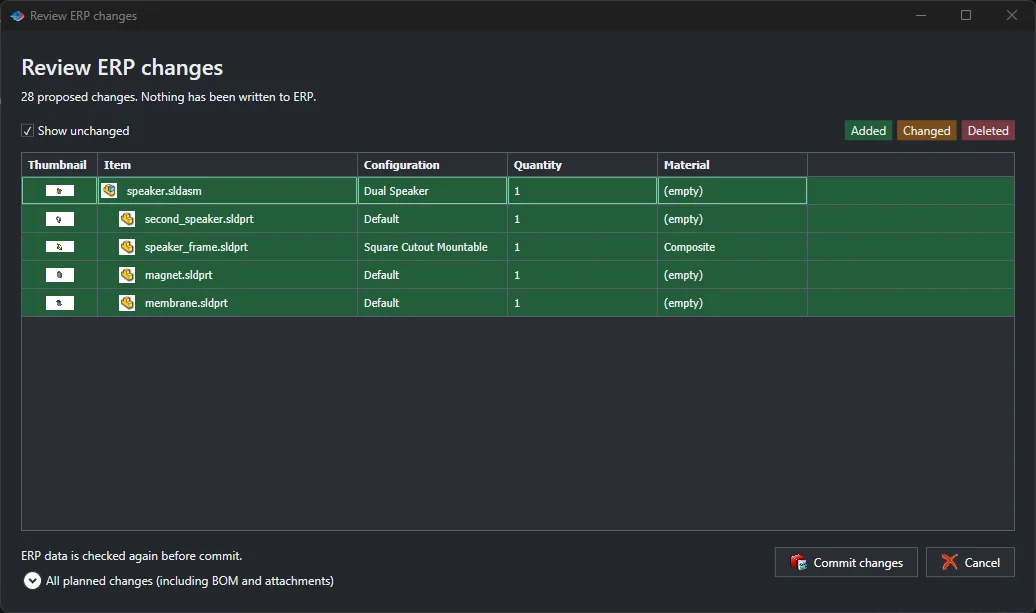
Push compares the assembly with Odoo and lists each product, field and BOM line it would add, change or remove. Skip empty values keeps a blank SOLIDWORKS property from wiping out something purchasing typed in Odoo.
Commit and open the BOM in Odoo
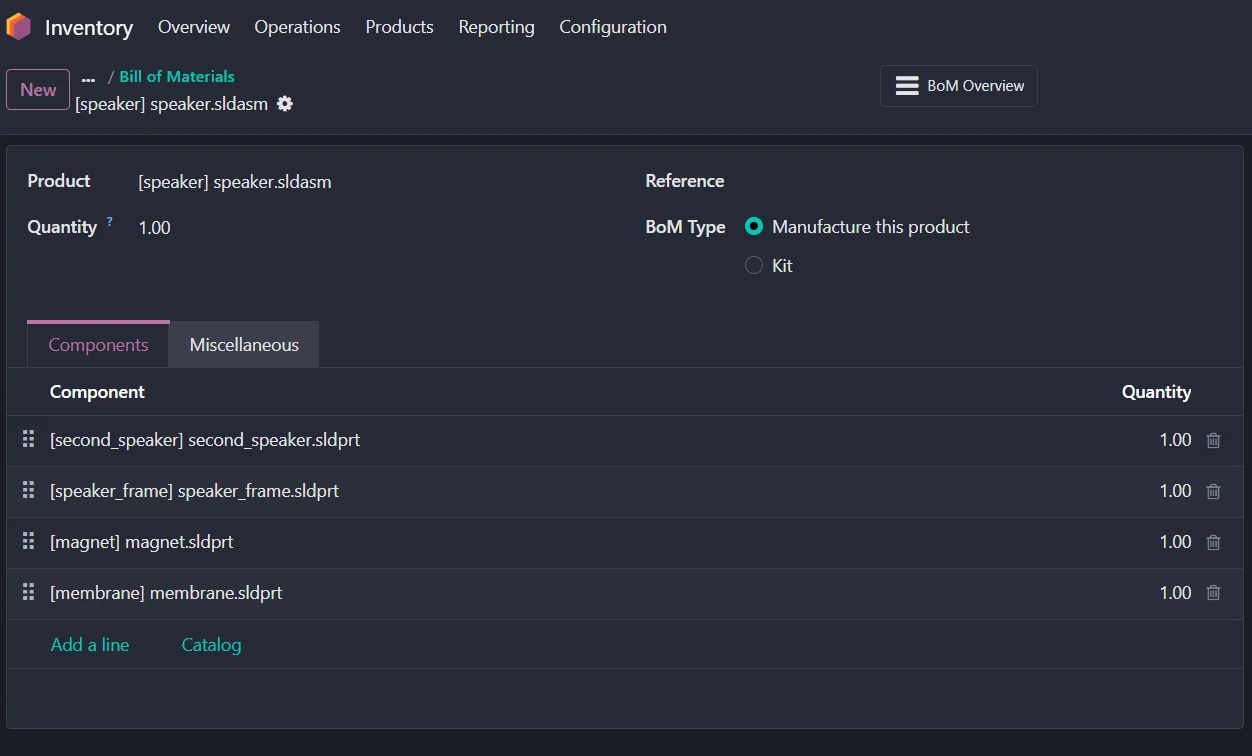
Commit writes the changes, after checking Odoo once more so nobody overwrites a colleague’s edit. The assembly appears in Odoo Manufacturing with every component and quantity.
Works with your Odoo
If your SOLIDWORKS computers can reach your Odoo database, ERP Sync can connect to it.
Odoo Online
Databases such as yourcompany.odoo.com.
Odoo.sh and self hosted
Any Odoo server reachable from your network.
API key sign in
No username or password is stored or sent.
More than one database
Pick the database by name on shared servers.
Not sure about your setup? Book a short call and we will check it with you.
PDMPublisher or a custom integration?
A custom connector has to read assemblies, configurations and cut lists, handle Odoo field types, avoid overwriting data and keep working through every SOLIDWORKS and Odoo upgrade. The build quote is rarely the real cost.
| PDMPublisher ERP Sync | Custom integration | |
|---|---|---|
| Time to first sync | ✓The same day | Weeks to months of development |
| Upfront cost | ✓None. Try the free Community Edition first | A development project |
| Review before writing | ✓Built in | ✕Only if you pay for it |
| SOLIDWORKS and Odoo upgrades | ✓Maintained by Blue Byte Systems | ✕Your cost, every time |
| Other ERPs | ✓ERPNext and Business Central connectors included | A new project per ERP |
| Also included | ✓Publishing to PDF, DXF and STEP, BOM Manager, Smart Pack and Go, Property Doctor | Only the integration |
What three years can cost
An example for three engineers. The custom build assumes a developer at US$120 per hour, 120 hours to build and test, and 20 hours a year of upgrades. Replace the numbers with your own quotes.
Pricing
ERP Sync is part of PDMPublisher for SOLIDWORKS, with publishing, BOM Manager, Smart Pack and Go and Property Doctor included.
Community
ERP Sync and BOM Manager on up to 10 rows. Enough to try a small assembly against your Odoo.
Single seat
Every tool with no row limits, for one engineer.
Team, 2 to 4 seats
The most common choice for engineering teams.
Department, 5 or more
For larger teams rolling ERP Sync out across the company.
Guides
Questions
Do I need SOLIDWORKS PDM to sync with Odoo?
No. ERP Sync runs inside SOLIDWORKS on the open assembly. SOLIDWORKS PDM is not required.
Does it create new products or only update existing ones?
Both. Choose Properties to update existing products, or Create items and properties to create the missing ones first.
Can it update a BOM that already exists in Odoo?
Yes. The review lists every line that will be added, changed or removed before you commit.
Which SOLIDWORKS properties can I send?
Any custom or configuration specific property, plus values such as the file name and quantity. You choose the Odoo field for each one.
Can I keep purchased hardware out of Odoo?
Yes. Use Ignore Components for fasteners or purchased parts you do not want as Odoo products.
What if we use another ERP?
There are official connectors for ERPNext and Microsoft Dynamics 365 Business Central too. For anything else, ask us about a custom connector.
Push your first assembly to Odoo today
Download the free Community Edition and try it on a test database, or book a demo and we will walk through your properties and BOM structure with you.