US$0.00
0
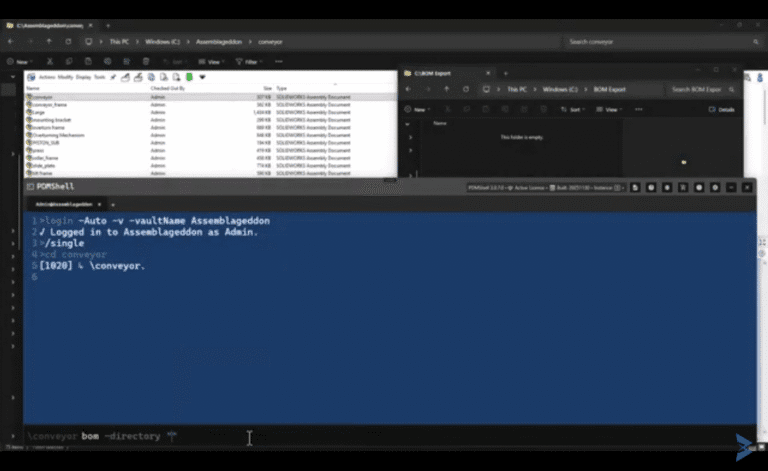
PDMShell BOM Command

Automating Bill of Materials Extraction in SOLIDWORKS PDM Using the PDMShell BOM Command

Ride of the Valkyries Alert 🎼 — Don’t listen if you don’t enjoy Wagner. When you are managing complex assemblies inside SOLIDWORKS PDM, generating a bill of materials (BOM) is a routine task, but i’s also one of the most
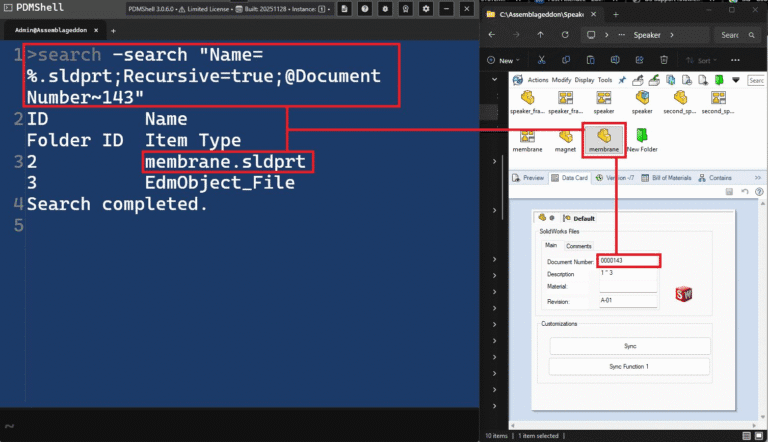
PowerShell PDMShell Search Command and Screenshot showing a split view of SOLIDWORKS PDM tools in dark mode. On the left is a PDMSHELL (PDMShell 3.0.6.0) console window with a completed search command highlighted in red: search --search "Name=%.sldprt;Recursive=true;@Document Number=143" The results show two files found: membrane.sldprt EdmObject_File On the right is the regular SOLIDWORKS PDM Explorer window open to a “Speaker” folder. The same file “membrane.sldprt” is selected (highlighted with a red border). Its data card in the lower pane shows: Document Number: 000143 (highlighted in red) Description: 1” 3 Material: Revision: A-01 The image demonstrates using PDMSHELL to quickly search the vault for all part files that have Document Number 143, instantly locating and highlighting the matching file “membrane.sldprt” in the vault.

PowerShell PDMShell Search Command: Complete Guide for SOLIDWORKS PDM Administrators

PDMShell gives SOLIDWORKS PDM administrators the ability to run precise, scriptable, and automated operations across large sets of files, and the PowerShell PDMShell search command is at the center of that capability. One of its most powerful features is the
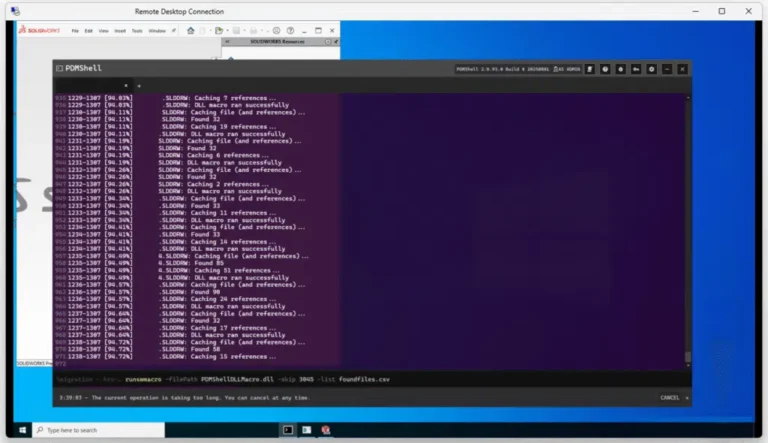
Virtual Machine Checklist for Your SOLIDWORKS PDM Large Data Transformation and Screenshot of a Windows Remote Desktop session running SOLIDWORKS. In the foreground is a dark-themed PowerShell window titled "PDMSHELL" (PowerShell 7.4.0). The console displays a long log of a macro execution with timestamps (e.g., 09:31:29–13:07) and repeated messages such as: SLDDRW: Caching 7 references... SLDDRW: DLL macro ran successfully SLDDRW: Found 32 references... SLDDRW: Caching file (and references)... The log shows progressive file counts (7, 6, 32, 11, 14, 85, 58, 15, etc.) and ends with a command line: textPS C:\> .\runswmacro -filePath "PDMSHELLDLL.dll" -skip 3045 -list foundfiles.csv A note below reads: "The current operation is taking too long. You can cancel at any time." In the background, a SOLIDWORKS window is partially visible with the SOLIDWORKS logo and menu bar. The overall scene demonstrates a batch macro processing many SOLIDWORKS drawing files via PowerShell, logging caching and reference resolution in real time.

Virtual Machine Checklist for Your SOLIDWORKS PDM Large Data Transformation/Migration

Performing a large dataset transformation in SOLIDWORKS PDM vault—whether for cleaning up, updating existing drawings, or merging with a new vault—is not just a technical task; it’s a business-critical operation. At Blue Byte Systems Inc., we’ve led many data migration

0
    0
    Your Cart
    Your cart is emptyReturn to Shop