
 USD
USD CAD
CAD EUR
EUR GBP
GBP AUD
AUD NZD
NZD CHF
CHF SEK
SEK NOK
NOK JPY
JPY CNY
CNY INR
INR SGD
SGD MXN
MXN BRL
BRL ZAR
ZAR KRW
KRW
Every PDM administrator eventually runs into the same argument. One camp says the vault is a database, so folders are irrelevant and you should just search for what you need. The other camp says folders matter, because the day the “LIBRARY” folder takes forty seconds to open, everybody notices.
Both camps are right, and the resolution is not a compromise between them. It is a naming convention.
The debate, as it actually plays out
A thread on the MyCAD forum captures this perfectly. A user asked whether SOLIDWORKS PDM should use a minimalist structure with one big library folder, or many categorized folders. His reasoning was sound: search by number and by data card variables should find the file, so why maintain a tree at all?
The problem was that his company had already tried it. They started with a single LIBRARY folder and split it into Assembly, Parts, Plans and Others precisely because “the loading when opening the LIBRARY folder was long.”
Other users in the thread confirmed the pattern from their own vaults, with one noting that PDM “starts to have slowness and stability from 3000” files in a folder. Treat that figure as a field observation rather than a published limit. It still lines up with what most administrators see. Somewhere in the low thousands of files per folder, browsing stops feeling instant.
The most interesting suggestion in the thread came from a user who proposed keeping a minimal tree indexed by numerical ranges, since every file in his vault already carried an 8-digit auto-generated number. That single idea is the subject of this article.
Why folders still cost you something
SOLIDWORKS PDM is a database-backed system, so it is tempting to assume the folder structure is cosmetic. It isn’t, because folders are what the client enumerates.
When a user expands a folder in the local view, the client has to reconcile every child item in that folder: name, current version, local version, state, checked-out-by, locked status, plus whatever data card columns the administrator chose to display. That reconciliation happens over the network against the archive server and the SQL database, and it happens for every item in the folder, not just the one the user wants.
Put ten thousand parts in one folder and you have created a request that is ten thousand items wide, triggered every time somebody clicks the folder. Add a cold cache, a remote site over a WAN, or a replicated archive, and the cost multiplies. Meanwhile the SQL side pays for it too. Folder-scoped queries, permission evaluation, and column population all scale with the number of children.
Search, by contrast, is indexed and cheap. That is exactly why the “just search for it” camp has a point. It is also exactly why it doesn’t save you. Users still browse. New engineers browse, subcontractors browse, and everyone browses when they don’t know the number yet.
Why category folders are the wrong fix
Splitting LIBRARY into Parts, Assemblies and Drawings helps for about a year. Then the Parts folder is the new LIBRARY.
Category-based structures have three structural weaknesses.
They don’t bound growth. A category folder grows without limit. Nothing in the scheme tells you when to split it, so it gets split reactively, after the slowdown rather than before.
They require judgment. Is a purchased weldment a Part or an Assembly? Is a fixture a Tool or a Component? Every ambiguous case is a decision, and different people decide differently. As one forum participant pointed out, category navigation only works when metadata is properly populated in the first place, and if the metadata is that good, you didn’t need the categories.
They make files move. Reclassify a component and it changes folder. Folder-based permissions, folder-based workflows and anything downstream that cached a path now have to follow it.
Categories are metadata. Your vault already stores metadata, and it stores it better than a directory tree can.
The fix: serial numbers plus numeric range folders
The alternative is to stop treating the folder as a taxonomy and start treating it as an address.
Give every file a serial number from the PDM serial number generator. Then place it in a folder determined mechanically by that number, where the first digits define the bucket.
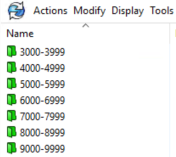
This structure earns its keep in five ways.
- It is deterministic. Given a file number, you know its folder without asking anyone. Given a folder, you know exactly which numbers it holds. No convention document, no tribal knowledge.
- It bounds folder size by construction. A
4000-4999folder physically cannot exceed 1,000 items. You never wake up to a 12,000-file folder, because the scheme won’t let you build one. If 1,000 is still too many for your workload, use a tighter range such as4000-4099, or add a second level for 8-digit numbers, such as12000000-12009999\12003000-12003999. - Files never move. A serial number is assigned once and never changes. Neither does the folder. Revisions, reclassifications and lifecycle changes all happen in place, so folder permissions and cached paths stay valid for the life of the part.
- It scales predictably. Growth adds folders, not folder depth, and each new folder arrives pre-sized. Capacity planning becomes arithmetic.
- Search still works exactly as before. This is the part the minimalist camp cares about, and nothing is lost. The variable search, the data card search and the “where used” navigation are all unaffected. You have simply given every file a stable, boring physical home so browsing doesn’t punish you.
Serial numbers beat descriptive filenames
A related habit is worth breaking at the same time: filenames like BRACKET-LEFT-REV-B-FINAL.SLDPRT. Descriptive filenames encode information that changes. Revisions change, descriptions get corrected, projects get renamed, and each of those events tempts someone into renaming the file. Renames in a CAD environment are exactly as expensive as they sound.
A serial number encodes nothing but identity. The description lives on the data card, where it can be edited freely. The revision lives in the workflow, where it belongs. The number stays fixed from first save to end of life. That is what makes ERP integration, supplier packages and long-term traceability work, and what makes numeric range folders possible in the first place.
The half everyone forgets: your exports
Here is where most well-organized vaults quietly undo their own work.
The vault is disciplined. The published output is not. PDFs, DXFs and STEP files land in one flat network folder because that’s what the export task was configured to do on day one. Two years later that folder has 40,000 files in it. Unlike the vault, it has no database in front of it, no indexed search, and no client-side caching. It is a raw Windows share being browsed by the shop floor, purchasing and your suppliers, all of whom navigate by folder because that is all they have.
The performance argument that justified organizing the vault applies with more force to the export target, not less.
Automating it with PDMPublisher
This is why PDMPublisher exposes File number range as a path variable.
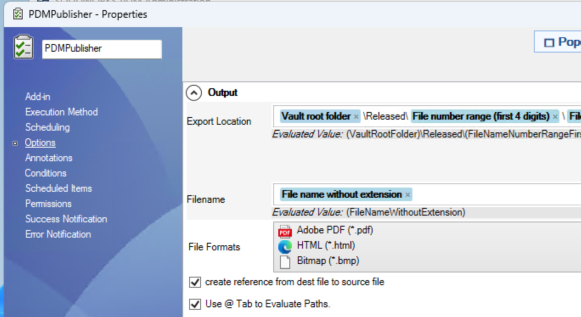
In the Output section of the task properties, the Export Location is assembled from tokens rather than typed as a literal path:
[Vault root folder]\Released\[File number range (first 4 digits)]\[File name without extension]PDMPublisher evaluates that expression per file at publish time. Part 4127 publishes to ...\Released\4000-4999\, part 7318 publishes to ...\Released\7000-7999\, and the folders are created as needed.
The practical effect is that your published output mirrors the discipline of your vault automatically. No scripts, no scheduled sorting job, no one manually filing PDFs. Run it as a SOLIDWORKS PDM task on a workflow transition and every approved drawing files itself into the correct range folder the moment it is released.
A short checklist
- Turn on the PDM serial number generator and make the number the filename.
- Choose a range size that keeps folders under roughly a thousand items, and leave headroom.
- Create the range folders up front, empty. Nesting a second level costs nothing and saves a migration later.
- Apply folder permissions to ranges, not to categories.
- Point your export tasks at the same range structure so published files inherit it.
- Keep descriptions and classifications on the data card, where they can change without touching the file.
The goal is not a beautiful folder tree. It is a folder tree nobody has to think about, one that stays fast at 200,000 files because no single folder ever holds more than a thousand.
Want to try it on your own vault?
PDMPublisher runs as a SOLIDWORKS PDM task and supports PDF, 3D PDF, DWG, DXF, STEP, IGES, X_T, STL, 3MF, IFC and more, with dynamic export locations like the one shown above.