
 USD
USD CAD
CAD EUR
EUR GBP
GBP AUD
AUD NZD
NZD CHF
CHF SEK
SEK NOK
NOK JPY
JPY CNY
CNY INR
INR SGD
SGD MXN
MXN BRL
BRL ZAR
ZAR KRW
KRW
Monday.com is a highly popular system for planning and managing projects and tasks. However, for teams using SOLIDWORKS PDM, a major hurdle remains syncing project data. Simply put, there is no official inherent integration with PDM systems in the Monday.com standard integrations. The amount of manual labor required for SolidWorks data migration between your PDM board and the Monday.com task board is tedious and increases the likelihood of human error in data migration, making a proper PDM sync essential.
In response to this challenge, our professionals at Blue Byte Systems Inc. have developed a custom (third-party integration tool) add-in that provides a positive experience with PDM sync between the Monday.com system and SOLIDWORKS PDM.
Our custom solution automates the sync of your Monday.com board tasks to corresponding data card fields in PDM. What’s the end result? You can work with real-time accuracy with your data and never do a manual update again. This integration bridges the gap between project management and engineering data the most efficiently.
Key Features:
- Rapid Setup & Quick Deployment: The add-in allows for a very simple setup process, which allows users to quickly map items on Monday.com boards to fields on PDM data cards.
- Data Synchronization: The add-in is designed to ensure real-time data consistency for a reliable PDM sync of important data from Monday.com to PDM.
- Configurable Mapping: Users are able to configure exactly which fields and items to sync, allowing the integration to be tailored to an individual project and only passing along relevant data.
Benefits:
- Improved Workflow Automation: Automated synchronization minimizes manual data entry and guarantees that everyone is working off the same accurate, up-to-date information on both platforms.
- Improved Collaboration Across Departments: By providing both project management and engineering teams with unified access to the most current project data, the add-on improves team communications and transparency of operations.
- Improved Efficiency with Increased Productivity: Reducing administrative burden enables engineering teams to put more effort into designing, improving efficiency overall.
- Data Accuracy: Integration forces everyone to work off the most current data that is guaranteed to be accessible to both the project management and engineering environments so everyone is working off the same information and especially not outdated information.
How To Use The PDM Sync Add-In?
The add-in’s configuration is structured to facilitate precise control over the data flow. Here’s what you need to do—
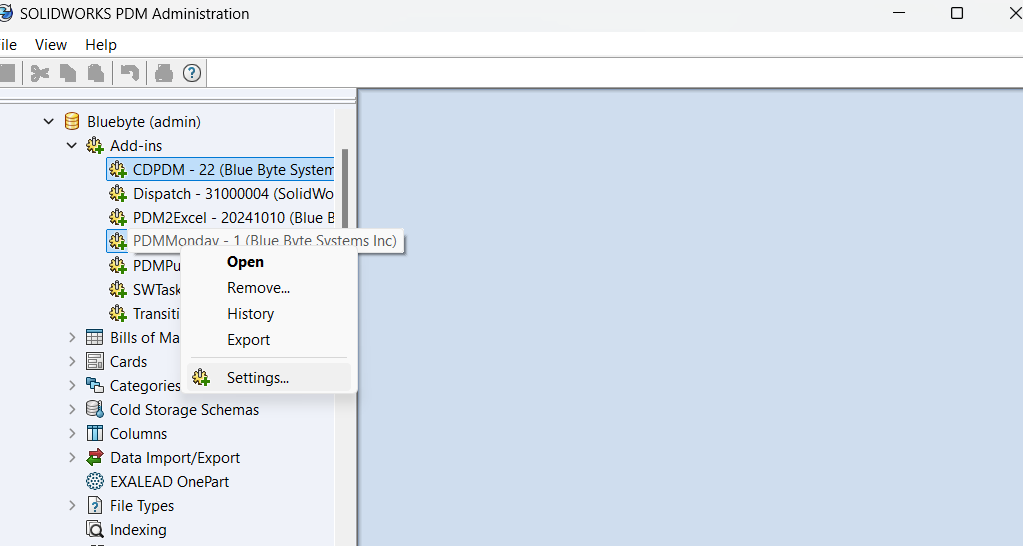
After adding the add-in to your vault via the Administration tool, right-click on the add-in to get the settings.
Mapping Section
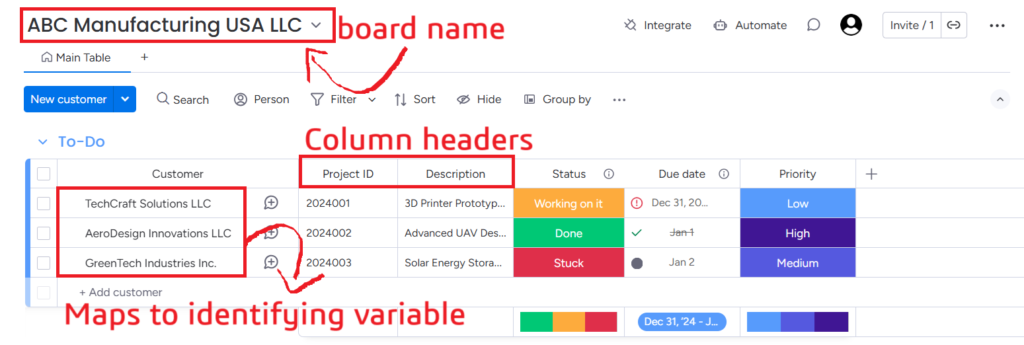
- Board Name: Identifies the Monday.com board name that is being mapped (i.e., it can represent a specific project board). For example, “ABC Manufacturing USA LLC”.
- Identifying Variable: Designates the main variable within PDM that acts as a unique identifying variable to a specific item on the Monday.com board (i.e., data is linked between the two systems). For example, “Customer Name” could be used to link data between the two systems.
- Mapping Array: This section is configured to map specific PDM Variables to Monday.com field titles (e.g., File Name > Task Name or Revision > Status).
Monday Section
API Key
- A sensitive key that is necessary for authenticating and authorizing API calls between the integration and Monday.com.
- The API key allows secure communication and data transfer, ensuring only authorized requests are processed.
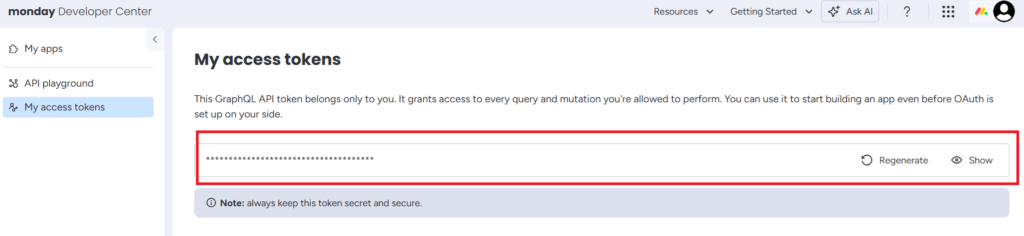
- You can obtain the token from Monday’s developer portal:
Once you have completed the configuration the add-in, open the card editor and add a button that triggers the add-in like follow:
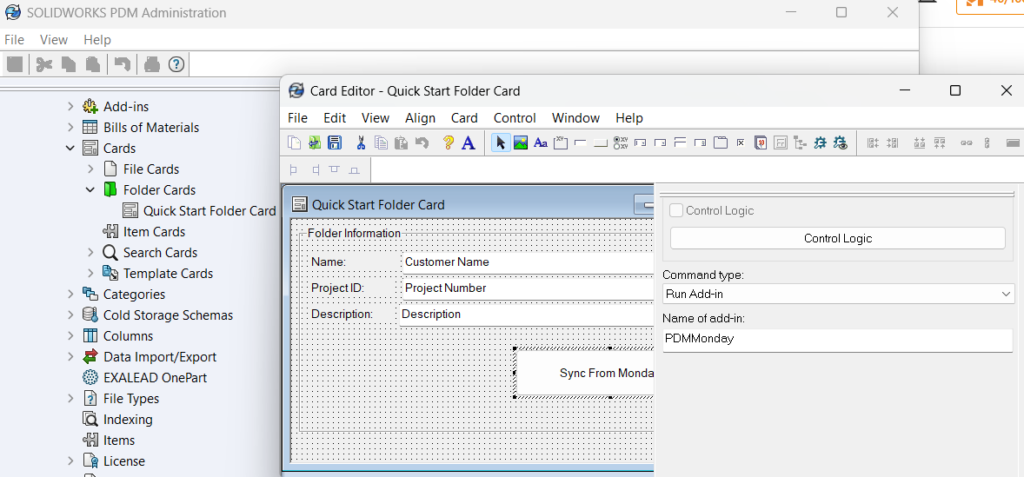
To test the add-in, go to a folder in PDM and click the button. Sometimes, you have click out and refresh the card to get the new values.
Custom Solutions At Blue Byte System Inc.
Our specialized PDM sync add-in is a reliable and robust solution that allows you to leverage a smooth workflow and control data integrity. The PDM sync add-in gives you a trustworthy way to Monday.com data migration without having to manually manage everything while worrying for human errors.
The PDM sync add-in developed by Blue Byte Systems Inc. connects your project management with engineering data so your teams can collaborate easily, improve accuracy, and concentrate on innovation. Please reach out if you wish to develop a custom add-in macro to best suit your specific workflow.