


US$0.00
0

Category: PDM API Tips

SOLIDWORKS PDM API Tip: Using IEdmDictionary5 for Secure and Flexible Settings Storage in SOLIDWORKS PDM

Using IEdmDictionary5 for Secure and Flexible Settings Storage in SOLIDWORKS PDM gives developers a reliable and safe way to store and retrieve configuration data inside the vault. The IEdmDictionary interface in the SOLIDWORKS PDM API allows you to manage settings that can be specific to an add-in or a user, while keeping everything protected through the vault’s login system. This approach removes the need for external files and ensures your data stays both organized and secure. Advantages Retrieving Settings To retrieve the stored settings, use the StringGetAt method: User-Specific Settings You can create user-specific settings by appending the username to the dictionary key: Best Practices
Read More »

SOLIDWORKS PDM API TIP: Cancel certain events in PDM

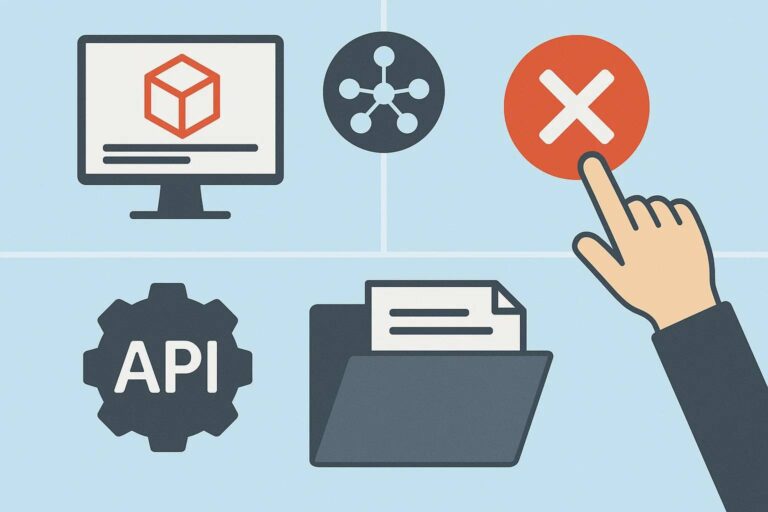
By registering to the correct hooks in the GetAddInInfo method and by using poCmd.Cancel = 1 in the OnCmd method, your add-in can cancel certain events in PDM to prevent users from performing operations like deleting a critical file, checking in a document with incomplete metadata, or renaming an inappropriate part. This is the primary tenet for best practice data management and enforcement. PDM Event Hooks: Your Control Panel You can also cancel tasks during the EdmCmd_TaskLaunch hook. The following table provides an overview of the cancellable events that are available in your local SOLIDWORKS PDM vault. The use of these hooks is crucial to develop an add-in that will validieren mit PDM (validate with PDM) and maintain data integrity. Command Type Description EdmCmd_PreExploreInit Executed before a new instance of File Explorer is created. Used to personalize vault view tabs before display. EdmCmd_PreAdd Raised when a file is on the verge of being included in the vault. Utilized to provide naming conventions or verify file types. EdmCmd_PreAddFolder Raised when a new folder is on the verge of being added. Utilized for pre-creation verification or logic. EdmCmd_PreCopy Raised before copying a file. Provides an opportunity for custom processing or verification. EdmCmd_PreCopyFolder Raised prior to copying a folder. Utilized for pre-copy logic. EdmCmd_PreDelete Raised before deleting a file. A critical precaution against mistaken or unauthorized deletions. EdmCmd_PreDeleteFolder Triggers before a folder is deleted. Allows pre-deletion checking. EdmCmd_PreGet Triggers before getting a file from the vault (e.g., Get Latest/Get Version). Offers control over get. EdmCmd_PreLabel Triggers before creating a label. Useful in checking the creation of our content in the label. EdmCmd_PreLabelDelete Triggers before deleting a label. Allows checks before deletion. EdmCmd_PreLabelModify Triggers before changing a label. Allows checking or pre-modification processing. EdmCmd_PreLabelAddItem Occurs before putting an item in a label. Suits validation or custom processing. EdmCmd_PreLock Occurs before check-out of a file. Suitable for pre-check-out validation. EdmCmd_PreMove Occurs before moving a file. Supports pre-move validation or processing. EdmCmd_PreMoveFolder Occurs before moving a folder. Supports folder move validation. EdmCmd_PreRename Occurs before renaming a file. Suitable for pre-rename checks or custom processing. EdmCmd_PreRenameFolder Occurs before renaming a folder. Suits pre-rename validation. EdmCmd_PreShare Occurs before a file is shared between two folders. Implements pre-share logic. EdmCmd_PreState Triggered before setting the state of a file in a workflow. A strong hook for implementing challenging business rules. EdmCmd_PreUndoLock Triggered before undoing a check-out (equivalent to check-in of an unmodified file). EdmCmd_PreUnlock Triggered before the check-in of an updated file. Employs significant pre-check-in validation. A Practical Approach to API-Based PDM Customization Here’s how you would do this using the SOLIDWORKS PDM API Tip: As an example, you could use the EdmCmd_PreState hook to cancel certain events in PDM and prevent a file from moving into a “Released” state if all required data card variables are not filled out. This method of validation with PDM Blue guarantees that all files in your environment are complete and correct, protecting your data integrity right from the beginning. Our Experts Are Here to Help You For expert add-in development and professional SOLIDWORKS support, visit Blue Byte System Inc. We specialize in offering services to improve productivity and streamline your workflows.

Read More »

SOLIDWORS PDM API TIP: What is Hwnd?

Hwnd, or simply what is hwnd, appears in many PDM API calls as a parameter and is unfortunately not well-defined in the SOLIDWORKS PDM API documentation.  Hwnd: Handle of window: a unique identifier in Win32. It identifies a window in File Explorer and is not persistent across different sessions of File Explorer (explorer.exe). This means that the window handle may change for the window. In the context of the SOLIDWORKS PDM API, the window handle is especially important because it allows:  💡HOW TO GET THE WINDOW HANDLE IN .NET: In WinForms, use to get the handle of the form. In a Console app, use Process.GetCurrentProcess().MainWindowHandle.ToInt32() In a WPF app, use new WindowInteropHelper(this).Handle.ToInt32() to get the handle of the active window.
Read More »

New for 2022! SOLIDWORKS PDM API Things You Can Do…They’re pretty cool.

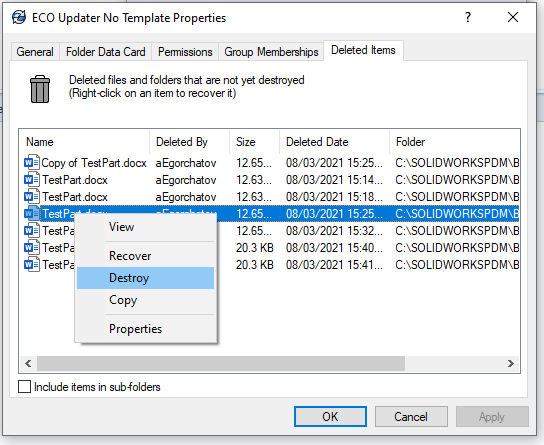
The 2022 release of the SOLIDWORKS PDM profession API did not introduce major changes to the API itself, aside from updates to the PDM web API docs. Even so, these improvements add more flexibility and expand the list of SOLIDWORKS PDM API things you can do, making everyday data management tasks more efficient. 1. You can rename BOM Views You can rename BOM views with PDM Professional 22 SP0.0. The new method is called Rename and is part of the IEdmBomView4 interface. The API help has a straightforward example on how to use it. 2. You can destroy deleted items from a folder You can now destroy files that you have deleted in a folder. Previously, this was not possible with the IEdmFolder12 interface. The interface has been extended by the IEdmFolder13. You can access the docs example here. 3. Serial number counter This is probably the most consequential update. You can now specify the next available counter for a particular serial number using this method. This is particularly useful if you were used to storing your counter in a SQL database. Now, you have control over the next available value. 4. Access to more user settings You can specify some killer user settings from a new interface IEdmUser11::SetSettingsVar. The settings are: EdmUSv_AutoDelete 9 = Whether to automatically delete local read-only files that are not part of the vault; 1 = true, 0 = false; this setting corresponds to the “Automatically delete local read-only files that are not part of the file vault” checkbox on the Explorer tab on the Settings dialog that appears when you click “Settings” on the Properties dialog of a user in the Admin Tool EdmUSv_AutoGetLatest 11 = Whether to always work with the latest version of files; 1 = true, 0 = false; this setting corresponds to the “Always work with the latest version of files” checkbox on the Reference Dialog tab on the Settings dialog that appears when you click “Settings” on the Properties dialog of a user in the Admin Tool EdmUSv_AutoGetLatestRefs 43 = Whether to auto-select reference files to get latest when checking out; 1 = true, 0 = false; this setting corresponds to the “Auto select reference files to get latest when checking out” checkbox on the Reference Dialog tab on the Settings dialog that appears when you click “Settings” on the Properties dialog of a user in the Admin Tool
Read More »

A Quickstart Guide with the SOLIDWORKS PDM Web API

Disclaimer: In 2022, SOLIDWORKS Corp. quietly released documentation for its SOLIDWORKS PDM web API. This feature of PDM Professional installs an IIS web application (Web API) that exposes certain elements of your vault to the web. Any web application can now access your PDM vault, provided IIS and your firewall are configured correctly. As usual, this feature is only available with PDM Professional. At first glance, the documentation is quite dry, if not unreadable. After a couple of back-and-forths with API support, SOLIDWORKS confirmed that the docs were auto-generated and that they plan to create proper documentation in the future. The API support team was able to walk through some of the most common endpoints and showcase how to make the proper calls. In this article, I’d like to go over the authentication endpoint and the file information endpoint. Before we do that, you need to install the Web API component. For further SOLIDWORKS PDM API help, you can always contact our team. Once you have the web API installed, you need to make sure to: Once done, you can use Postman to hit the authentication endpoint like this: Your response should look like this: You will need to use the JwtString (Access token) in subsequent calls. In Postman, just make sure you add the JwtString as a bearer token. This can be done from the Authorization tab. Unfortunately, there is no way to determine when the access token expires. It seems that in this version of the SolidWorks PDM Web API, you need to continue using the token until you receive an unauthorized exception. API support has indicated that they are aware of this and will likely include this as an improvement in the future. What’s Next?

Read More »
0
0
Your Cart
Your cart is emptyReturn to Shop