US$0.00
0

Category: SOLIDWORKSPDM2022

New for 2022! SOLIDWORKS PDM API Things You Can Do…They’re pretty cool.

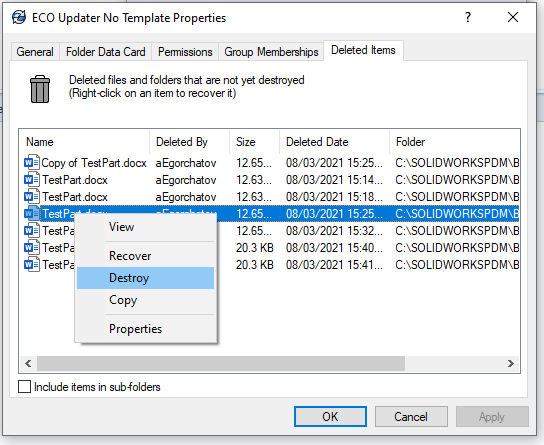
The 2022 release of the SOLIDWORKS PDM profession API did not introduce major changes to the API itself, aside from updates to the PDM web API docs. Even so, these improvements add more flexibility and expand the list of SOLIDWORKS PDM API things you can do, making everyday data management tasks more efficient. 1. You can rename BOM Views You can rename BOM views with PDM Professional 22 SP0.0. The new method is called Rename and is part of the IEdmBomView4 interface. The API help has a straightforward example on how to use it. 2. You can destroy deleted items from a folder You can now destroy files that you have deleted in a folder. Previously, this was not possible with the IEdmFolder12 interface. The interface has been extended by the IEdmFolder13. You can access the docs example here. 3. Serial number counter This is probably the most consequential update. You can now specify the next available counter for a particular serial number using this method. This is particularly useful if you were used to storing your counter in a SQL database. Now, you have control over the next available value. 4. Access to more user settings You can specify some killer user settings from a new interface IEdmUser11::SetSettingsVar. The settings are: EdmUSv_AutoDelete 9 = Whether to automatically delete local read-only files that are not part of the vault; 1 = true, 0 = false; this setting corresponds to the “Automatically delete local read-only files that are not part of the file vault” checkbox on the Explorer tab on the Settings dialog that appears when you click “Settings” on the Properties dialog of a user in the Admin Tool EdmUSv_AutoGetLatest 11 = Whether to always work with the latest version of files; 1 = true, 0 = false; this setting corresponds to the “Always work with the latest version of files” checkbox on the Reference Dialog tab on the Settings dialog that appears when you click “Settings” on the Properties dialog of a user in the Admin Tool EdmUSv_AutoGetLatestRefs 43 = Whether to auto-select reference files to get latest when checking out; 1 = true, 0 = false; this setting corresponds to the “Auto select reference files to get latest when checking out” checkbox on the Reference Dialog tab on the Settings dialog that appears when you click “Settings” on the Properties dialog of a user in the Admin Tool

Read More »

A Quickstart Guide with the SOLIDWORKS PDM Web API

Disclaimer: In 2022, SOLIDWORKS Corp. quietly released documentation for its SOLIDWORKS PDM web API. This feature of PDM Professional installs an IIS web application (Web API) that exposes certain elements of your vault to the web. Any web application can now access your PDM vault, provided IIS and your firewall are configured correctly. As usual, this feature is only available with PDM Professional. At first glance, the documentation is quite dry, if not unreadable. After a couple of back-and-forths with API support, SOLIDWORKS confirmed that the docs were auto-generated and that they plan to create proper documentation in the future. The API support team was able to walk through some of the most common endpoints and showcase how to make the proper calls. In this article, I’d like to go over the authentication endpoint and the file information endpoint. Before we do that, you need to install the Web API component. For further SOLIDWORKS PDM API help, you can always contact our team. Once you have the web API installed, you need to make sure to: Once done, you can use Postman to hit the authentication endpoint like this: Your response should look like this: You will need to use the JwtString (Access token) in subsequent calls. In Postman, just make sure you add the JwtString as a bearer token. This can be done from the Authorization tab. Unfortunately, there is no way to determine when the access token expires. It seems that in this version of the SolidWorks PDM Web API, you need to continue using the token until you receive an unauthorized exception. API support has indicated that they are aware of this and will likely include this as an improvement in the future. What’s Next?

Read More »
0
    0
    Your Cart
    Your cart is emptyReturn to Shop