
 USD
 CAD
 EUR
 GBP
 AUD
 NZD
 CHF
 SEK
 NOK
 JPY
 CNY
 INR
 SGD
 MXN
 BRL
 ZAR
 KRW
SOLIDWORKS to Odoo: PDMPublisher vs OdooPLM and CADLink
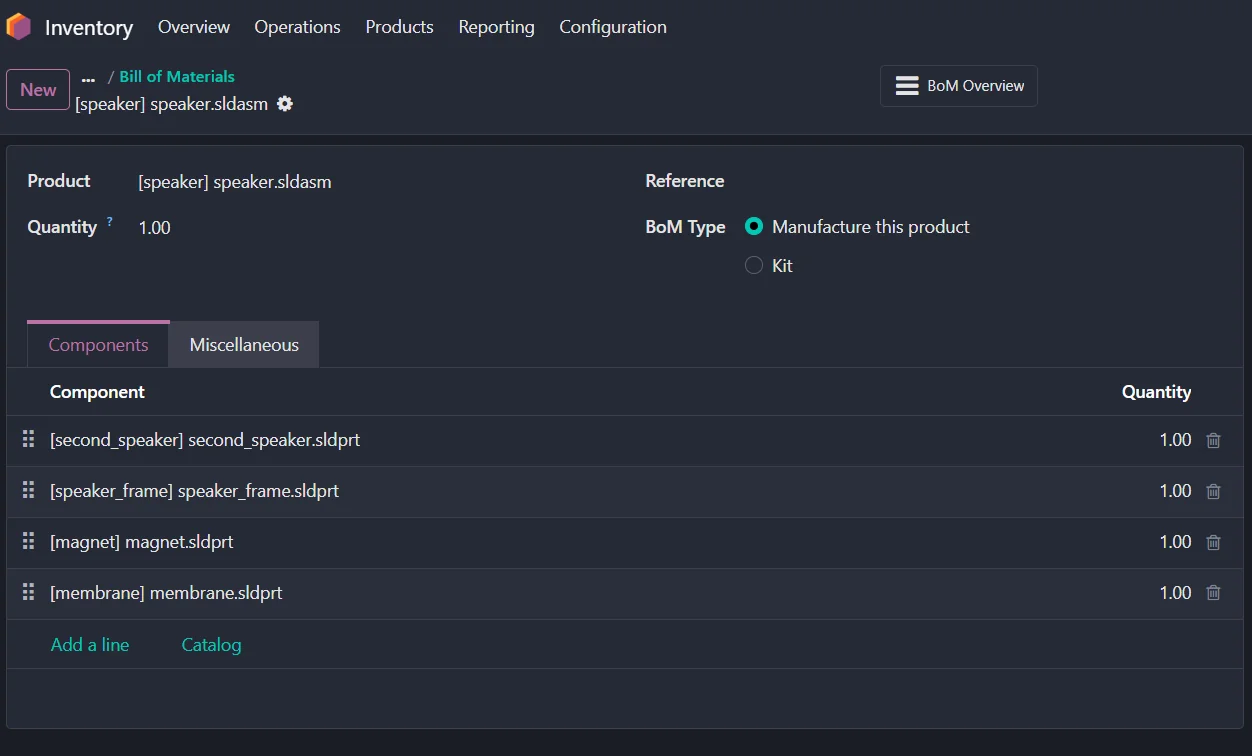
PDMPublisher ERP Sync pushes SOLIDWORKS items, properties and BOMs to Odoo from the open assembly, and you review every change before anything is written. No new PLM and no middleware. Here is how it compares with OdooPLM and CADLink.
ERP Sync is included in the free Community Edition for up to 10 rows.
At a glance
The biggest difference is where your engineering data lives: in your current SOLIDWORKS setup, or in Odoo itself.
 PDMPublisher ERP Sync | OdooPLM | CADLink | |
|---|---|---|---|
| Made by | Blue Byte Systems | OmniaSolutions (Italy) | QBuild Software (Canada) |
| Approach | SOLIDWORKS add-inPushes items, properties and BOMs from the open assembly to Odoo. | PLM inside OdooOpen-source Odoo modules plus a Windows CAD client. | Hosted CAD-to-ERP linkWeb-based and hosted by QBuild. |
| Keeps your PDM | ✓YesWorks with or without SOLIDWORKS PDM. PDMShell can sync straight from a PDM vault. | Replaces itOdoo manages check-in, check-out and revisions. | ✓YesWorks from CAD. A PDM Professional edition is also available. |
| Items and BOMs | ✓Yes | ✓YesWith revisions and lifecycle workflows. | ✓YesItem master and BOMs, with write-back to CAD. |
| Review before writing | ✓Every line, then commitYou see every product and BOM line that will be added, changed or removed before anything is written. | Through check-in | ✓Color-coded comparison |
| Talks to Odoo directly | ✓No middlewareRuns on the workstation and connects to your Odoo with an API key. | ✓Odoo modulesInstalled on your Odoo server. Self-hosting supported. | ✕ |
| Other ERPs | ✓ERPNext, Business Central | ✕ | ✓About 29 ERPs |
| Support | ✓Direct, North American hoursSupport comes straight from the developers who build the product, during North American business hours. | From OmniaSolutions | From QBuild |
| Published price | ✓From US$299/seat/yrIncluded in PDMPublisher Premium: US$399 per seat per year for 1 seat, down to US$299 for 5 or more. | ✓Open-source modulesServer modules are LGPL and AGPL. CAD client pricing not published. | ✕ |
| Free version | ✓Community, 10 rowsERP Sync is included in the free Community Edition for up to 10 rows. | ✓Open source | ✕ |
| Free trial | ✓7 days | ✓Through Odoo Apps | ✕ |
✓ Listed on the vendor’s website · ✕ Not listed or not published · Tap + for details
Sources: odooplm.omniasolutions.website and github.com/OmniaGit/odooplm (OdooPLM), qbuildsoftware.com (CADLink), checked in October 2026. Products change, so tell us if anything here is out of date and we will fix it.
See it in action
Short videos from the PDMPublisher playlist, starting with the SOLIDWORKS Odoo connector.
Why teams choose PDMPublisher ERP Sync
Get items and BOMs into Odoo without changing how you work in SOLIDWORKS.
Keep your setup
No new PLM to roll out and no hosted middleware. ERP Sync talks to your Odoo directly from the workstation.
Nothing written blind
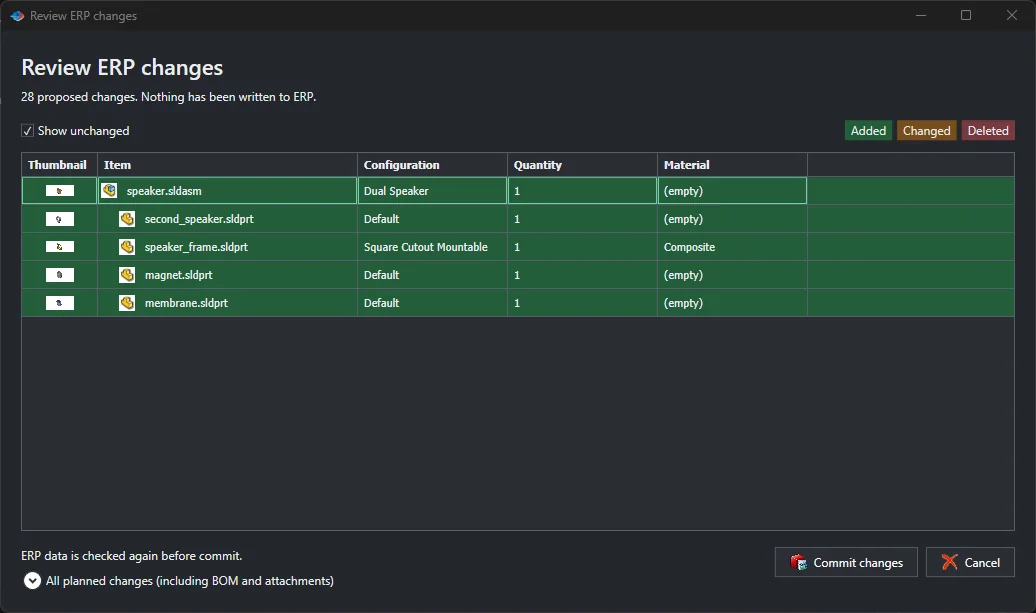
You review every product and BOM line that will be added, changed or removed, then commit.
Three ERPs, one license
Odoo, ERPNext and Business Central are included, with a free Community Edition and support from the developers in North American hours.
How ERP Sync works
Map your properties once, then push from the open assembly whenever you need to.
Connect
Pick the Odoo connector and sign in with an API key. Choose the database by name on shared servers.
Map
Map SOLIDWORKS custom and configuration properties to Odoo product fields.
Review
See every product and BOM line that will be added, changed or removed.
Commit
Nothing is written to Odoo until you approve it.
Read more about the SOLIDWORKS Odoo integration, or sync from your vault with the SOLIDWORKS PDM Odoo connector in PDMShell.
What customers say
This product has helped immensely with aiding our procurement dept in being able to find what they need to source our weldments, without asking Engineering any questions. Setup was extremely easy and support is fantastic.
This product has saved my team many hours a week in compiling PDF files. Amen has been extremely responsive and helpful getting us up and running and troubleshooting any issues we may have.
Questions
Do I need SOLIDWORKS PDM to sync with Odoo?
No. ERP Sync runs inside SOLIDWORKS on the open assembly. If you do use SOLIDWORKS PDM Professional, PDMShell can also sync items, data card properties and BOMs from the vault.
Should I choose OdooPLM instead?
Choose OdooPLM if you want Odoo to manage your CAD documents, revisions and check-out. Choose PDMPublisher if you want to keep your current SOLIDWORKS or PDM setup and only send items and BOMs to Odoo.
Can it update a BOM that already exists in Odoo?
Yes. The review lists every line that will be added, changed or removed before you commit.
Does it work with other ERPs?
Yes. ERPNext and Microsoft Dynamics 365 Business Central connectors are included, and you can request a custom connector for another ERP.
Where does the comparison information come from?
From each vendor’s public website, checked in October 2026. If something has changed, email support@bluebyte.biz and we will update this page.
Push your first assembly to Odoo today
Download the free Community Edition and try it on a test database, or book a demo and we will walk through your properties and BOM structure with you.
OdooPLM and CoreBOM are products of OmniaSolutions. CADLink is a product of QBuild Software. CUSTOMTOOLS is a product of ATR Soft. Odoo is a trademark of Odoo S.A. All trademarks belong to their owners. Blue Byte Systems is not affiliated with these companies.