
 USD
 CAD
 EUR
 GBP
 AUD
 NZD
 CHF
 SEK
 NOK
 JPY
 CNY
 INR
 SGD
 MXN
 BRL
 ZAR
 KRW
PDMShell vs GoExpress and myPDMtools
PDMShell gives your PDM admin full control of SOLIDWORKS PDM Professional automation: readable scripts on menus, transitions, tasks and schedules, plus AI, with published pricing and support straight from the developers. Here is how it compares with GoExpress and myPDMtools.
Or start with the free edition. No credit card needed.
At a glance
All three need SOLIDWORKS PDM Professional. They differ in who builds the automation, how you change it and what you can see before you buy.
 PDMShell | GoExpress | myPDMtools | |
|---|---|---|---|
| Made by | Blue Byte Systems | GoEngineer | Visiativ (France) |
| What it is | Scripting engine + PDM add-inA console, a visual editor and a PDM add-in for SOLIDWORKS PDM Professional. | Automation framework add-inA PDM Professional add-in configured with actions, triggers and variables. | About 20 PDM toolsA package of about 20 tools for SOLIDWORKS PDM Professional. |
| Who builds it | ✓You, in scripts or visuallyYour PDM admin writes readable scripts or uses the visual editor, with optional help from AI. | GoEngineerGoEngineer builds configuration files from actions, triggers and variables. | Preset per toolEach tool is set up for its own job. |
| Menus and transitions | ✓Menus, transitions, tasksRight-click menus, workflow transitions, PDM tasks on your task host, and schedules. | ✓Menus, transitions and moreAdd, check in and out, copy, menu, card button, serial number and workflow state triggers. | ✓Per toolFor example, TaskActions runs in PDM tasks and DocPublication creates PDFs on approval. |
| Bulk data card updates | ✓From a CSV | ✓From a CSV | ✓From ExcelDataRecovery and PDMProperties. |
| ERP | ✓Odoo connectorItems, data card properties and BOMs, with a preview before every sync. | ✓ERP sync, BOM export | ✕ |
| AI assistants | ✓Claude, ChatGPT, CodexMCP server for Claude, ChatGPT and Codex, plus Ollama in the built-in chat. You approve commands before they run. | ✕ | ✕ |
| Support | ✓Direct, North American hoursSupport comes straight from the developers who build the product, during North American business hours. | Through GoEngineer | Through Visiativ |
| Published price | ✓From US$699/seat/yrUS$999 per seat per year for 1 to 2 seats, US$799 for 3 to 8 and US$699 for 9 or more. Perpetual licenses available. | ✕ | ✕ |
| Free version | ✓Free editionSearch results up to 5 items and scripts up to 5 lines. No credit card. | ✕ | ✕ |
| Free trial | ✓7 days | ✕ | ✓30 daysOffered by Visiativ UK. |
✓ Listed on the vendor’s website · ✕ Not listed or not published · Tap + for details
Sources: goengineer.com (PDM Automation Services and the GoExpress blog), mycad.visiativ.com and visiativ.co.uk (myPDMtools), checked in October 2026. Products change, so tell us if anything here is out of date and we will fix it.
See it in action
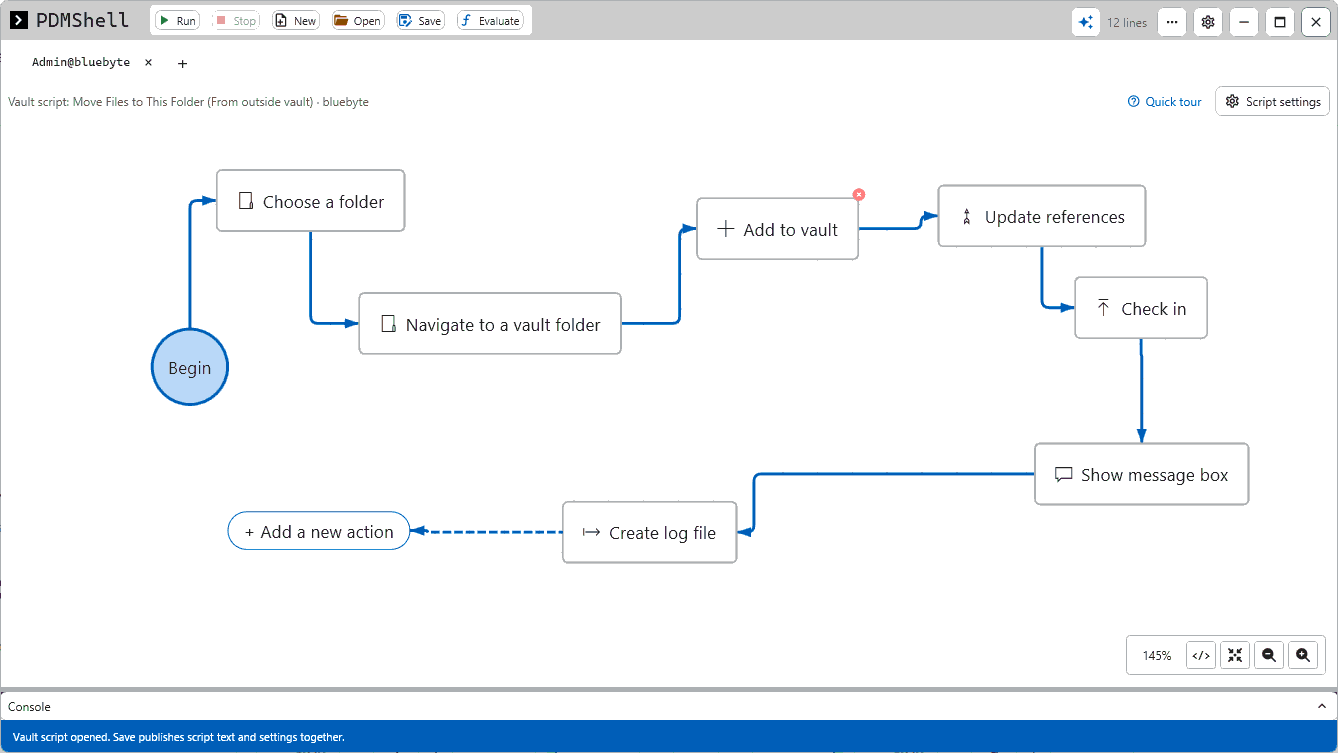
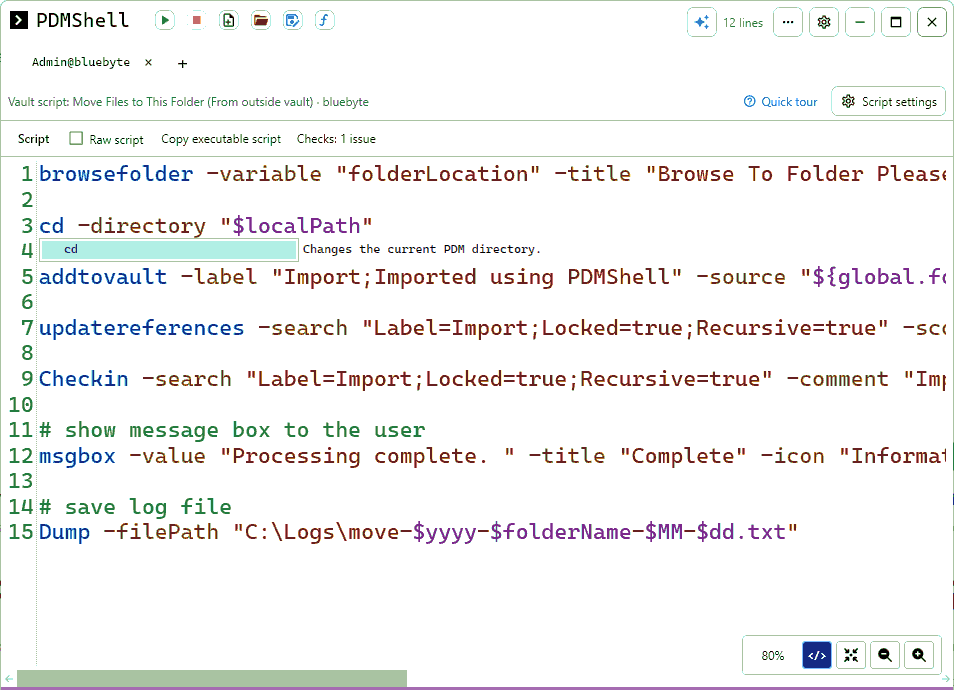
Short videos from the PDMShell playlist. Click any video to watch it here.
Why teams choose PDMShell
Automation you own, can see and can change the same day.
You own the automation
Scripts are plain text saved in your vault. Your PDM admin can read them, version them and change them without waiting on a consultant.
More ways to run it
Right-click menus, workflow transitions, PDM tasks on your task host, schedules, and AI assistants through the MCP server.
No surprises
A free edition, a 7-day trial and per-seat prices on the website, with support straight from the developers in North American hours.
What PDMShell does in your vault
Write a script once, then run it the way that fits the job.
Files at scale
Check in, check out, rename, move, copy, delete and recover thousands of files and folders in one command.
Variables and BOMs
Read and set data card variables, set revisions, export BOMs and update thousands of files from a CSV.
Menus and transitions
Put approved scripts on right-click menus and workflow transitions, with permissions and conditions.
Tasks and schedules
Run heavy jobs as PDM tasks on your task host, or on a schedule with pdmcli.
See every command in the PDMShell documentation.
New: sync your vault with Odoo
Neither GoExpress nor myPDMtools lists an Odoo connector. PDMShell does.
PDMShell Odoo connector
Sync items, data card properties and bills of materials from your SOLIDWORKS PDM vault to Odoo. Missing products are created and existing ones are matched by their internal reference.
Review every change in a side-by-side preview, then sync from the PDM right-click menu or automatically on release. It runs inside PDM Explorer, with no SOLIDWORKS session, no middleware and no custom code to maintain.

What customers say
Your website is very user-friendly. The tutorials are very easy to follow, and it only took me about 10 minutes to update variables from a CSV using the setvarfromsource command. Very well done!
Questions
Can PDMShell replace SOLIDWORKS PDM Dispatch?
For most jobs, yes. PDMShell puts scripts on right-click menus and workflow transitions like Dispatch, and adds variables, conditions, data card logic, a visual editor and AI.
Does PDMShell need SOLIDWORKS PDM Professional?
Yes. The standalone shell runs on a workstation and the add-in is deployed into your PDM Professional vault.
Can we move from GoExpress or myPDMtools to PDMShell?
Yes. Most automations become PDMShell scripts on the same menus and transitions. Book a short call and we will look at your current setup with you.
How is PDMShell priced?
Premium is US$999 per seat per year for 1 to 2 seats, US$799 for 3 to 8 seats and US$699 for 9 or more. Multi-year and perpetual licenses are also available, and the free edition costs nothing.
Where does the comparison information come from?
From each vendor’s public website, checked in October 2026. If something has changed, email support@bluebyte.biz and we will update this page.
Automate your vault this week
Try every Premium feature for 7 days, or book a demo and we will review your current GoExpress or myPDMtools setup with you.
GoExpress is a product of GoEngineer. myPDMtools is a product of Visiativ. All trademarks belong to their owners. Blue Byte Systems is not affiliated with either company.