



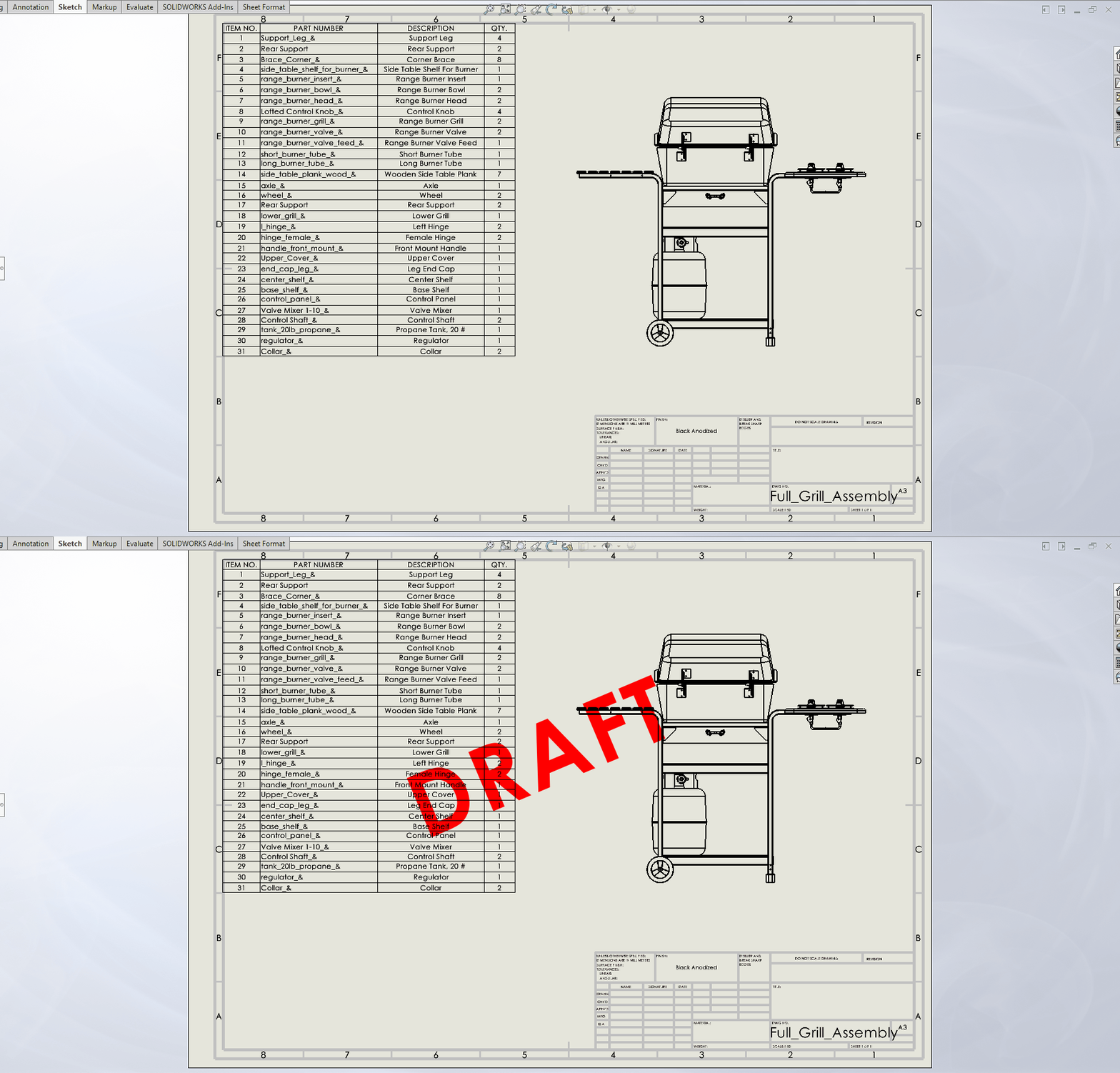
This strong macro adds a watermark to your drawings automatically, which will conserve your time as well as ensure consistency in all of your design documents. Click a few times and be able to insert a readable, centered watermark on the active sheet of your drawing document. This article is going to show you how you can automatically insert a SolidWorks drawing watermark using a macro.
What Does This Macro Do?
This macro is a fast, easy tool for any SOLIDWORKS user. It performs the following essential tasks:
- Adds a watermark to the active drawing sheet: Because the macro is acting upon the sheet that you have opened, it is easy to process multi-sheet drawings one by one.
- Positions the watermark in the center: It automatically figures out the center of the sheet and positions the watermark there for a professional look.
- Avoids redundancy: The macro is smart enough to find and delete any existing watermark at the same spot before inserting a new one. This keeps your drawings from becoming cluttered.
- Allows customization: It is simple to change the watermark text inside the code itself, thereby you may utilize words like “OBSOLETE,” “AS BUILT,” or any other marking that you need.
Why Should I Use This Macro?
Using a watermark drawing macro is the best way to control quality and communicate effectively on your projects. Instead of wasting precious time inserting and formatting notes manually, the macro is a simple, trusted answer.
- Work smarter: Avoid the unnecessary clicks and laborious formatting that come with inserting watermarks on all sheets of a big package of drawings.
- Make uniform: A macro makes all watermarks have the same position, font, and size, avoiding inconsistency from drawing to drawing, or project to project.
- Enhance clarity: Make non-final drawings visually distinguishable in order to avoid confusion and to make it visually obvious to stakeholders that a drawing is not an approved, final document.
How to Add a Watermark in a SolidWorks Drawing?
To add a watermark to your SolidWorks drawing, you don’t need any particular programming knowledge. Just follow these simple steps to get started:
- Download the Code: Download the complete VBA code of the watermark macro below.
- Open the VBA Editor: Click on Alt + F11 in SOLIDWORKS to open the VBA Editor.
- Add a New Module: Go to Insert > Module within the VBA Editor. This will open a new window where you will add the code.
- Insert the Code: Copy and paste the complete VBA script from the box below into the new module window.
- Change Your Watermark: Locate the line of code that says watermarkText = “DRAFT”. Simply type inside the quotes whatever you want your watermark to say. For example: watermarkText = “CONFIDENTIAL”.
- Run the Macro: Go back to SOLIDWORKS, open the drawing you want to alter, then go to Tools > Macro > Run. Select the new macro file you saved and click on “Open.”
The macro will execute instantly, and your watermark will be aligned centrally on the current drawing sheet.
The VBA Macro Code
'www.bluebyte.biz
Public Enum swVerticalJustification_e
swVerticalJustificationNone = 0
swVerticalJustificationBottom = 3
swVerticalJustificationMiddle = 2
swVerticalJustificationTop = 1
End Enum
Public Enum swTextJustification_e
swTextJustificationCenter = 2
swTextJustificationLeft = 1
swTextJustificationNone = 0
swTextJustificationRight = 3
End Enum
Public Enum swDocumentTypes_e
swDocASSEMBLY = 2
swDocDRAWING = 3
swDocIMPORTED_ASSEMBLY = 7
swDocIMPORTED_PART = 6
swDocLAYOUT = 5
swDocNONE = 0
swDocPART = 1
swDocSDM = 4
End Enum
Public Enum swLeaderStyle_e
swNO_LEADER = 0
End Enum
Option Explicit
Sub main()
    ''''''''''''''''''''
    Dim watermarkText As String
    'set watermark text here
    watermarkText = "DRAFT"
    ''''''''''''''''''''

    Dim swApp As Object
    Dim swModel As Object
    Dim swDraw As Object
    Dim swSheet As Object

    Set swApp = Application.SldWorks


    If swApp Is Nothing Then
    MsgBox ("Failed to get the solidworks application.")
    Exit Sub
    End If

    Set swModel = swApp.ActiveDoc
    If swModel Is Nothing Then
    swApp.SendMsgToUser "No document open."
    Exit Sub
    End If

    If swModel.GetType() <> swDocumentTypes_e.swDocDRAWING Then
    swApp.SendMsgToUser "Macro only runs on drawing documents."
    Exit Sub
    End If

    Set swDraw = swModel

    Dim addRet As Boolean
    addRet = AddWatermark(swDraw, watermarkText)

    If addRet = False Then

    swApp.SendMsgToUser "Failed to get add watermark"

    End If


End Sub


    Private Function AddWatermark(ByVal swModel As Object, ByVal watermarkText As String) As Boolean
    On Error GoTo handler:
    Dim swWidth As Double
    Dim swHeight As Double
    Dim swDrawingDoc As Object
    Dim selectionMgr As Object
    Dim swSheet As Object
    Dim swAnn As Object
    Dim swNote As Object
    Dim swTextFormat As Object

    Set swDrawingDoc = swModel
    Set swSheet = swDrawingDoc.GetCurrentSheet()
    Dim props As Variant
    props = swSheet.GetProperties2()
    swWidth = props(5)
    swHeight = props(6)

    swDrawingDoc.EditTemplate

    swModel.ClearSelection2 (True)

    'attempt to get existing note and delete if it exists in the same position
    Dim selectionRet As Boolean
    selectionRet = swModel.Extension.SelectByID2("", "NOTE", swWidth * 0.5, swHeight * 0.5, False, -1, 0, Nothing, 0)
    If (selectionRet) Then
       swModel.DeleteSelection False
    End If
    Set swNote = swModel.InsertNote("" + watermarkText)
    swNote.BehindSheet = True
    If Not swNote Is Nothing Then
        swNote.SetBalloon 0, 0
        Set swAnn = swNote.GetAnnotation()
        swAnn.SetLeader3 swLeaderStyle_e.swNO_LEADER, 0, True, False, False, False
        Set swTextFormat = swModel.GetUserPreferenceTextFormat(0)
        swTextFormat.Escapement = 0.4
        swTextFormat.CharHeight = 0.04
        swAnn.SetTextFormat 0, False, swTextFormat
        swAnn.SetPosition swWidth * 0.5, swHeight * 0.5, 0
        swNote.SetTextJustification (swTextJustification_e.swTextJustificationCenter)
        swNote.SetTextVerticalJustification (swVerticalJustification_e.swVerticalJustificationMiddle)
    End If
    swModel.ClearSelection2 (True)
    swDrawingDoc.EditTemplate
    swDrawingDoc.EditSheet
    AddWatermark = True
    swModel.ForceRebuild3 False

    Exit Function
handler:
    AddWatermark = False
End Function
Need a Custom Modification?
This free macro is a quick solution to solidworks drawing add watermark, but we know that every engineering workflow is unique. So, if you need a more advanced version tailored to your needs, or one based on a custom property to define the text, we’re here to help.
At Blue Byte Systems Inc., we excel at creating bespoke VBA macros and add-ins that are ideally suited to your individual requirements. So if you have a concept for a bespoke macro or a bug you’d like resolved, don’t hesitate to get in touch with us here for a quote or free consultation. Together, let’s achieve even higher productivity, ya?